

Education
WireGuard vs OpenVPN speed: Where IKEv2 fits (2026)
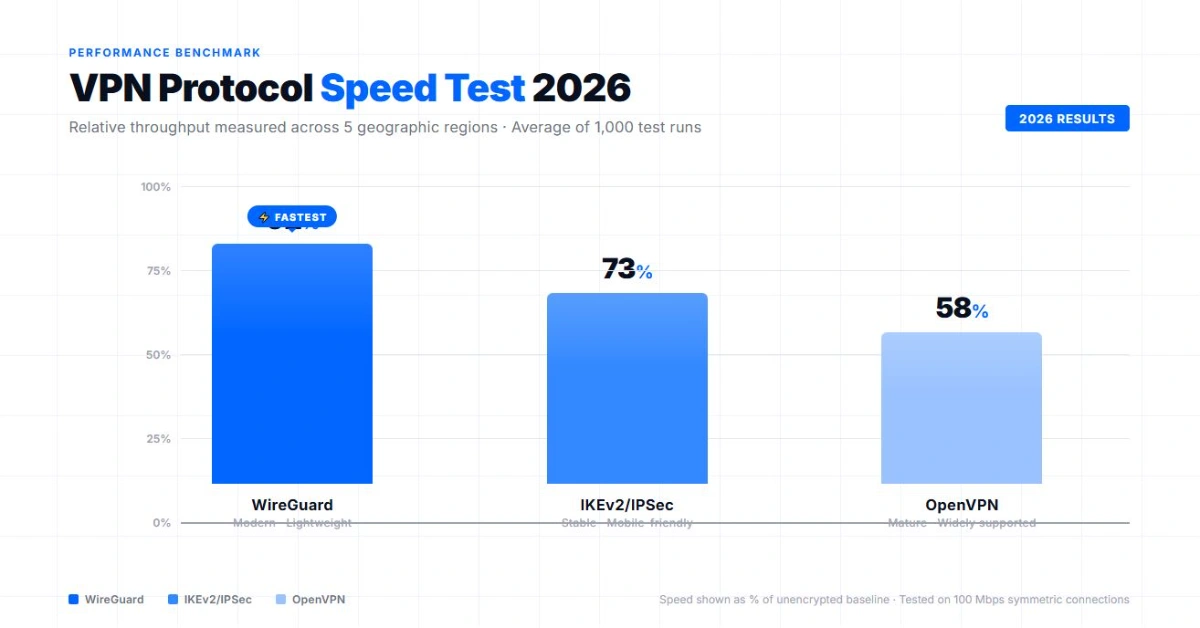
WireGuard vs OpenVPN speed has no universal percentage. WireGuard is designed as a compact, modern, UDP-based tunnel and is usually the first option to compare for performance. OpenVPN remains valuable for compatibility and transport flexibility. IKEv2 with IPsec still has a legitimate role on mobile and managed networks.
What is a VPN protocol, exactly?
A VPN protocol is the set of rules that two devices follow to build a private connection over a public network. It authenticates both ends, negotiates encryption keys, then wraps your traffic inside an encrypted tunnel so it can travel safely to the VPN server. The protocol is not the app, the server network, or the no-logs policy. It is the specific method used to set up and protect that tunnel, and different methods trade off speed, compatibility, and how easy they are to audit.
This page compares the three protocols you are most likely to see as options in a current VPN app: WireGuard, OpenVPN, and IKEv2 with IPsec. Two older protocols still appear in some settings menus and are worth knowing by name. L2TP/IPsec pairs the Layer 2 Tunneling Protocol with IPsec for encryption, and is mostly kept for compatibility with older systems rather than chosen for new deployments. PPTP is older still: the IETF published its specification as RFC 2637 in 1999, but only as an informational document, never as a ratified internet standard. Security researchers Bruce Schneier and Mudge documented serious weaknesses in PPTP's authentication and encryption in a 1998 peer-reviewed paper presented at the ACM Conference on Computer and Communications Security, breaking both its challenge-response authentication and its RC4-based encryption. Apple removed PPTP from its built-in VPN client starting with iOS 10 and macOS Sierra in 2016, and providers including NordVPN and ExpressVPN have since dropped PPTP from their apps. Windows 11 still includes PPTP as a native connection type. On Android, availability depends on the Android version and device implementation, so users should not assume that PPTP remains available. If a provider still offers PPTP, treat it as a legacy option, not a security recommendation.
WireGuard, OpenVPN, and IKEv2/IPsec are the protocols compared in detail on this page. The sections below cover what each one does well, starting with how they affect real-world speed.
The quick verdict
Choose it when your app offers it and you want a lightweight modern tunnel.
Test it rather than assuming a fixed speed gain. Use UDP for normal comparisons. Try TCP when a network blocks UDP or reliability matters more than peak throughput. IKEv2 is an Internet Standard used with IPsec. It remains relevant for native clients, enterprise deployments, and changing connections. The fastest choice depends on your device, provider, server, route, and current network. Protocol labels are a starting point, not a guaranteed benchmark.
What actually changes protocol speed?
A VPN protocol authenticates endpoints, exchanges keys, establishes an encrypted tunnel, and carries packets. CPU support, app implementation, server load, distance, packet loss, routing, and transport can all change performance.
| Device | Processors and operating systems handle cryptographic work differently. |
| Server | Distance, capacity, congestion, and routing can outweigh the protocol difference. |
| Transport | UDP avoids reliable transport inside the tunnel. TCP can help as a fallback but may add delay under loss. |
| Implementation | Commercial apps add privacy layers, connection logic, and proprietary variations. |
Read what a VPN does for the wider context.
WireGuard: simple, modern, and UDP only
WireGuard uses the Noise_IK handshake pattern and a fixed suite including Curve25519, ChaCha20-Poly1305, and BLAKE2s. It does not negotiate a long menu of algorithms. That focused design can reduce complexity and make the implementation easier to review.
WireGuard uses UDP rather than TCP. Its project also warns that the performance benchmarks published on its own site are old and were not well conducted. For that reason, a responsible WireGuard vs OpenVPN speed comparison should not promise one universal retention percentage.
WireGuard does not include traffic obfuscation. Its documentation says obfuscation should be implemented as a separate layer above the protocol.
Providers may wrap WireGuard in their own systems. NordLynx is WireGuard-based. ExpressVPN Lightway is separate: ExpressVPN says it built Lightway independently after choosing not to adopt WireGuard.
OpenVPN: configurable and widely compatible
OpenVPN can operate over UDP or TCP. Its official manual says the protocol is designed to work optimally over UDP and describes TCP as an alternative when UDP cannot be used.
OpenVPN UDP
Use UDP for the normal performance comparison with WireGuard. It avoids placing a reliable TCP stream inside another TCP stream.
OpenVPN TCP
TCP can help when a firewall blocks UDP. Using TCP port 443 does not make OpenVPN traffic identical to HTTPS and does not guarantee passage through inspection. It is a compatibility option, not automatic obfuscation.
OpenVPN offers broad configuration flexibility, so two provider implementations can perform differently despite sharing the same label.
IKEv2 and IPsec: still relevant
IKEv2 is not obsolete. RFC 7296 classifies Internet Key Exchange Protocol Version 2 as an Internet Standard. It negotiates authentication and security associations for IPsec, which carries protected traffic.
MOBIKE lets an IKEv2/IPsec connection change network attachment while maintaining the VPN session. That can help when a phone moves between Wi-Fi and cellular data. IKEv2/IPsec also remains common in native operating-system clients and managed environments.
How to run a repeatable speed test
A single screenshot cannot prove which protocol is faster. Keep conditions fixed and compare medians.
01. Measure a baseline
Disconnect the VPN and record download, upload, and latency several times with one endpoint.
02. Fix the variables
Use the same device, internet connection, provider, server city, and test endpoint.
03. Repeat each option
Test WireGuard, OpenVPN UDP, OpenVPN TCP, and IKEv2 when available. Reconnect before each group.
04. Compare medians
Use the median, not the best run. Record failures, reconnection behavior, packet loss, and battery impact separately.
Repeat at another time if server load changes. See why a VPN can be slow for other causes.
Which protocol should you choose?
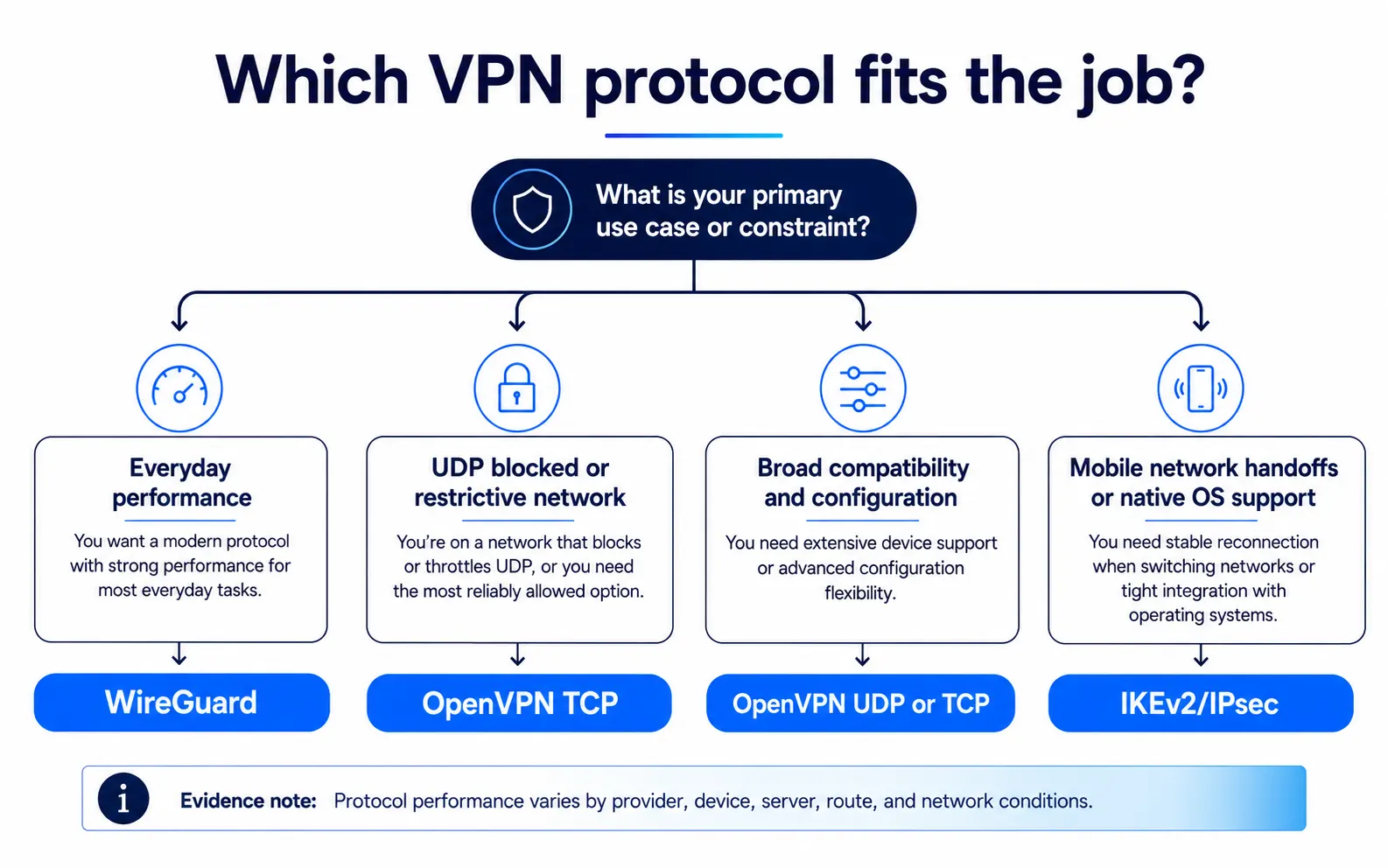
| Priority | Start with | Reason |
|---|---|---|
| Everyday performance | WireGuard | Focused modern design and UDP transport |
| Broad compatibility | OpenVPN UDP | Mature, configurable, and widely available |
| UDP is blocked | OpenVPN TCP | Useful transport fallback |
| Native or managed setup | IKEv2/IPsec | Operating-system and enterprise integration |
| Mobile network changes | IKEv2/IPsec or WireGuard | Compare reconnection behavior in your app |
No base protocol guarantees access through deep packet inspection. Look for a provider-specific obfuscated mode when a network is restrictive. Start with WireGuard for a normal consumer comparison, keep OpenVPN for flexibility, and consider IKEv2/IPsec where its integration is useful. If you are choosing a protocol during installation, follow our device-by-device VPN setup guide.
FAQ
Primary sources
- WireGuard protocol
- WireGuard performance notes
- WireGuard known limitations
- OpenVPN official manual
- RFC 7296: IKEv2
- RFC 4555: MOBIKE
- ExpressVPN on Lightway and WireGuard
Published: April 30, 2026 | Last updated: September 14, 2026 | Author: Simon Phillips