

Education
VPN vs proxy vs Smart DNS: Key differences (2026)
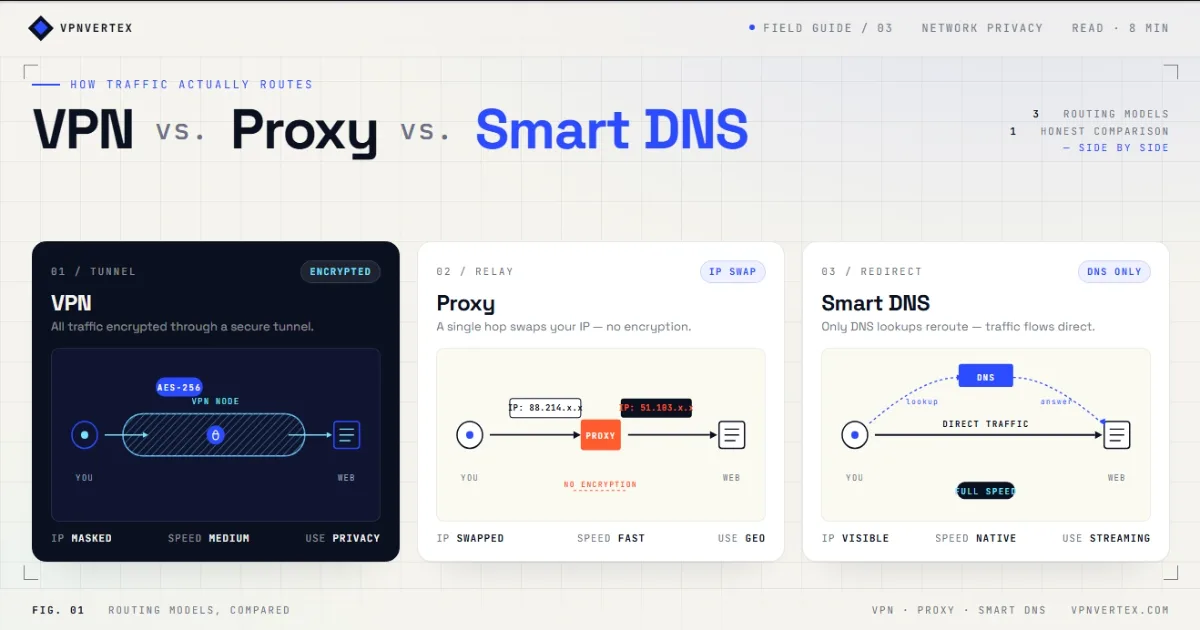
VPN vs proxy vs Smart DNS is not a choice between three versions of the same product. A VPN creates an encrypted tunnel, a forward proxy relays selected traffic, and Smart DNS changes how supported domain names are resolved. The right option depends on what traffic you need to handle and whether privacy is part of the job.
VPN vs proxy vs Smart DNS: the quick answer
Choose a VPN when you want an encrypted connection for most or all device traffic. Choose a forward proxy when one application needs a different network route or egress address. Choose Smart DNS only for a supported media device or service where encryption is not required. None of these tools makes a user anonymous, and none guarantees access to a website or streaming catalog.
The distinction matters because marketing pages often blur the categories. A proxy can be encrypted or unencrypted depending on its protocol. Smart DNS may alter selected DNS responses, but it does not create a VPN tunnel. A VPN protects traffic only between your device and the VPN server; you still need to trust the VPN operator and the destination service.
How VPNs, proxies, and Smart DNS work
VPN: an encrypted tunnel
A VPN client encrypts traffic between the device and a VPN server. The server then forwards requests to their destinations. Websites normally see the server's public IP address. Cloudflare's VPN overview explains that the VPN server decrypts traffic before forwarding it to the public internet, so this is not end-to-end protection by itself.
Proxy: a relay for selected traffic
A forward proxy sits between a client and a destination. The client sends requests to the proxy, which sends them onward using its own address. The exact security depends on the proxy type and the application protocol. An HTTP proxy, HTTPS CONNECT proxy, SOCKS proxy, and modern encrypted MASQUE proxy are not interchangeable.
Smart DNS: selective DNS handling
Smart DNS changes how selected service domains resolve and may route limited requests through provider infrastructure. The main media traffic usually does not pass through an encrypted VPN tunnel. Provider support is service-specific and can change without notice.
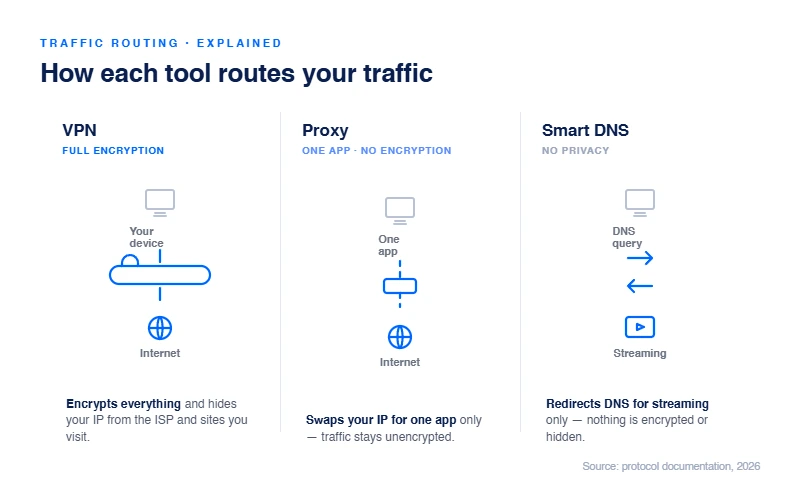
VPN vs proxy vs Smart DNS comparison
| Question | VPN | Forward proxy | Smart DNS |
|---|---|---|---|
| What does it handle? | Usually device or selected-app traffic | Configured application or protocol traffic | Selected DNS requests |
| Encrypted tunnel? | Yes, to the VPN server | Depends on proxy protocol and app | No VPN tunnel |
| Changes visible IP? | Usually, for tunneled traffic | Usually, for proxied traffic | Not necessarily for media traffic |
| ISP visibility | ISP sees the VPN connection, not tunneled destinations | Depends on proxy encryption and HTTPS | ISP may still observe destination traffic |
| Typical setup | App, operating system, or router | Browser, app, OS, or automation tool | DNS settings on a supported device |
| Main use | Network privacy and secure remote routing | Application routing, testing, or automation | Supported media devices without VPN apps |
| Guarantees access? | No | No | No |
Performance cannot be reduced to a fixed percentage. Distance, server load, protocol overhead, device hardware, peering, and the destination all affect results. Smart DNS avoids a full VPN tunnel, but DNS handling is only one part of a connection and does not guarantee faster video delivery.
When a VPN is the better fit
A VPN is usually the clearest choice when the goal includes protecting traffic on an untrusted network or routing several applications through the same remote server.
| Public Wi-Fi | The encrypted tunnel protects traffic between your device and the VPN server from local network observers. |
| Remote work | An organization may use a VPN to connect approved devices to private resources. Business access controls still require MFA, least privilege, and endpoint security. |
| Multiple apps | A system-level VPN can route browser, messaging, and other application traffic without configuring each program separately. |
| Network privacy | The ISP can see a connection to the VPN server but cannot directly read the destinations inside the encrypted tunnel. |
A VPN does not remove the need for HTTPS, safe account practices, or trustworthy software. Cloudflare's VPN security overview also notes that a VPN provider may be able to observe or log activity. Read our VPN basics guide for a fuller explanation of the trust model.
When a proxy is the better fit
A forward proxy is useful when traffic must be routed at the application level rather than across the whole device. Common legitimate cases include testing regional website behavior, applying an organizational web policy, or assigning controlled egress addresses to automated workloads.
The statement that every proxy provides no encryption is incorrect. A basic HTTP proxy may expose requests, while HTTPS CONNECT, SOCKS over a secure channel, and MASQUE-based systems can protect traffic differently. Cloudflare's Privacy Proxy documentation describes encrypted MASQUE tunnels where the proxy learns the destination but not the request content. This is still a proxy architecture, not evidence that every public proxy is safe.
Avoid unknown free proxy lists. A proxy operator can control routing, collect metadata, inject content into unencrypted sessions, or simply disappear. For business testing or automation, use an accountable provider, restrict credentials, and confirm the protocol actually protects the traffic you send.
When Smart DNS is the better fit
Smart DNS has a narrow role: a supported television, console, or media device cannot run a VPN app, and the user does not need VPN encryption for that task. Support must be checked against the provider's current documentation rather than assumed from an old review.
NordVPN states that its SmartDNS feature does not protect a device like a VPN and may not work with every streaming service. ExpressVPN says MediaStreamer is not a VPN, does not provide VPN privacy or security, and cannot change locations. Surfshark discontinued Smart DNS support on February 2, 2026.
These changes are why a blanket recommendation such as "all major VPNs include Smart DNS" is unreliable. Device compatibility, supported services, IPv4 requirements, account registration, and available regions vary by provider.
Important limitations before choosing
A different IP does not equal anonymity
Accounts, cookies, browser fingerprints, payment details, and location permissions can still identify a user. VPNs and proxies change one part of the network path.
Smart DNS is not a privacy service
It does not create a full encrypted tunnel. Treat it as a compatibility feature for supported media services, not a security control.
Access is never guaranteed
Websites and streaming platforms can use account region, billing information, GPS, cookies, device data, or known server addresses. Their rules and detection methods change.
Service rules still apply
A technical route does not override a platform's subscriber agreement, licensing territory, workplace policy, or local law. Hulu, for example, limits availability to the United States and certain US territories.
Which one should you use?
- Need encrypted routing for most device traffic? Start with a VPN.
- Need one browser, app, or automated job to use a controlled relay? Use an appropriate forward proxy and verify its protocol.
- Need a supported media feature on a device without a VPN app? Check whether your provider still offers Smart DNS and whether the specific service is supported.
- Need anonymity against a capable observer? None of these options alone is a complete answer. Define the threat model before choosing a tool.
Do not stack all three without a documented reason. Multiple routing layers can create DNS conflicts, connection failures, and confusing leak-test results. If a VPN is not behaving as expected, use our guide to test whether a VPN connection is working before adding another layer.
Frequently asked questions
Verdict
For general network privacy, a VPN is the most complete of these three tools because it creates an encrypted tunnel for selected or device-wide traffic.
A proxy is the more precise option for application routing and technical workflows. Smart DNS is a narrow media-device feature whose provider support can disappear, as Surfshark's 2026 discontinuation shows. Choose by traffic scope and trust requirements, not by promises of guaranteed access or fixed speed gains. Keep HTTPS enabled, follow service rules, and test the actual route after configuration. Our walkthrough on testing a VPN connection covers the IP, DNS, and leak checks that show which tool is really carrying your traffic.
Published: May 2, 2026 · Last updated: July 26, 2026 · Author: Simon Phillips