

Lifestyle
Best VPN for torrenting: Privacy features compared

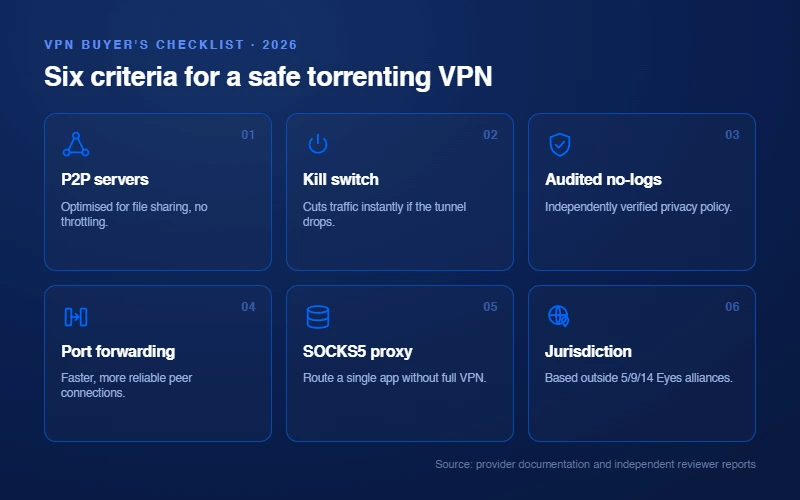
The best VPN for torrenting is the one whose documented features match your lawful file-sharing needs. Focus on a kill switch, clear P2P support, current privacy documentation, and a setup you can verify before opening a BitTorrent client.
Quick verdict
A sensible choice if you want documented P2P support, a kill switch, and a familiar app experience.
Worth comparing for households that need unlimited simultaneous connections and P2P-friendly service.
Its current documentation covers P2P servers and port forwarding on supported paid-plan desktop platforms.
Torrenting itself is not the legal issue
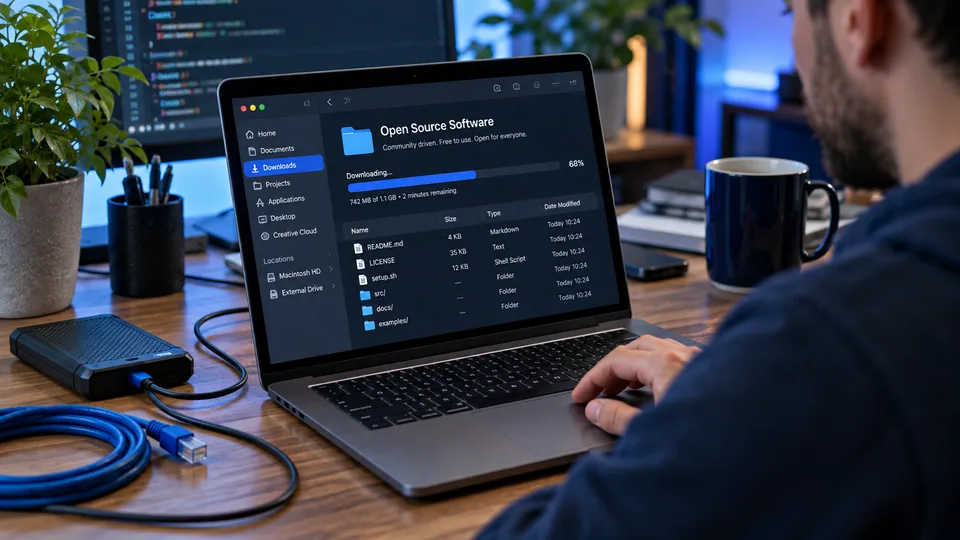
BitTorrent is a file-sharing protocol with legitimate uses: distributing open-source software, public-domain media, game updates, and creator-authorized files. Copyright law still applies to every file you download or share. A VPN is a privacy tool, not permission to access or distribute material you do not have the right to use.
That distinction matters when comparing providers. Ignore claims that a VPN makes you invisible or protects every activity automatically. The useful question is whether its documented controls reduce avoidable exposure when you share lawful files.
What to compare before choosing a VPN
P2P policy and server labeling
Check the provider’s own support pages for whether P2P traffic is permitted and whether dedicated or labeled servers are required. Proton VPN, for example, identifies P2P servers in its apps. Do not assume that a provider’s general privacy marketing means every server or device setup supports every P2P feature.
Kill switch and client binding
A kill switch is designed to stop traffic if the VPN connection drops. Client binding adds another layer by tying a BitTorrent client to the VPN network interface, so it cannot use the ordinary connection. Availability and setup differ by operating system, so verify both in the current app documentation.
Privacy evidence
Look for a clear privacy policy, public audit history, and an explanation of what the provider says it retains. An audit is useful evidence, but it is not a blanket promise of anonymity. Your account logins, browser fingerprint, downloaded files, and endpoint security still matter.
Port forwarding, only if you need it
Port forwarding can make incoming peer connections possible, but it opens a controlled route through the VPN firewall. It is not a universal requirement, and it adds configuration responsibility. Players who care about incoming connections and route quality for the same reasons will find that side in our VPN guide for gaming. Choose it only when the provider documents the feature for your plan and platform.
Provider options for lawful P2P use
NordVPN
NordVPN documents P2P-friendly servers and SOCKS5 proxy configuration for compatible BitTorrent clients. The practical fit is someone who wants a consumer-focused app with P2P support and is comfortable checking the provider’s current server and feature documentation before use. See NordVPN’s current plans.
Surfshark
Surfshark is worth considering when several people or devices share one subscription. Its support materials describe unlimited simultaneous connections and P2P use. Confirm the current plan, device support, and renewal terms at checkout instead of relying on a static promotional price. See Surfshark’s current plans.
Proton VPN
Proton VPN is the clearest option here for people who specifically need supported port forwarding. Its current documentation says paid plans can use port forwarding on Windows, macOS, and Linux, with a P2P server required. The assigned port can change after reconnecting, so the BitTorrent client needs to be updated accordingly. See Proton VPN’s current plans.
ExpressVPN
ExpressVPN remains an editorial comparison option for readers who prefer its app design or support model. Check its current documentation, supported operating systems, and price directly before deciding. It is not an affiliate partner on VPNVertex at this time.
When port forwarding makes sense
Port forwarding is most relevant when you want incoming peer connections and your VPN provider explicitly supports it. Proton VPN explains that the feature works through its VPN firewall, not through your home router, and that the active port can change when you reconnect.
Do not enable it simply because a checklist says it may improve connections. Use a maintained client from a trusted source, keep it updated, and disable router UPnP or NAT-PMP when the VPN provider’s instructions require that to avoid conflicts. Proton’s port-forwarding guide is a useful example of the platform-specific details involved.
A safer setup for lawful downloads
| Step | Why it matters |
|---|---|
| Use a legitimate source | A VPN does not verify a file’s license, safety, or origin. |
| Enable the VPN kill switch | It can reduce traffic exposure if the VPN connection stops unexpectedly. |
| Bind the BitTorrent client where supported | This can help prevent the client from falling back to the normal network interface. |
| Keep the OS and client updated | Updates address known vulnerabilities and compatibility problems. |
| Review the provider’s current support page | P2P, port-forwarding, and platform support change over time. |
For a broader primer on privacy tools and their limits, read our VPN basics guide and our explainer on VPN kill switches.
The trade-offs behind each recommendation
NordVPN: simple consumer setup
NordVPN is our general pick because it keeps the decision simple for a typical home user. The relevant feature list is easy to understand: select a P2P-compatible server when required, enable the kill switch, and use the provider’s current app documentation when you need SOCKS5 or another advanced setting. That is a better basis for a recommendation than a claimed download-speed percentage, which can vary widely with the swarm, server distance, local network, ISP routing, and the file itself.
The trade-off is that it is not the clearest choice if port forwarding is the specific requirement. Do not infer port-forwarding support from P2P server support. They are different features and a provider can offer one without the other.
Surfshark: account flexibility
Surfshark’s strongest practical differentiator is unlimited simultaneous connections. That can simplify device coverage for a household with several phones, laptops, and supported TV devices. For lawful peer-to-peer use, still review the current P2P policy and use the kill switch where the app provides it. A large device allowance does not change the legal status of a file, and it does not make every device configuration equally private.
The trade-off is the usual long-term subscription question. Promotional terms, taxes, bundle contents, and renewal prices can change. Review the checkout total and the renewal conditions before purchase rather than selecting a provider based on an old price screenshot.
Proton VPN: a documented forwarding path
Proton VPN is the better match when you have a clear reason to use port forwarding and can follow platform-specific instructions. Its support documentation states that paid plans can use the feature on Windows, macOS, and Linux, with a P2P server required. The active port is assigned by the service and may change when the connection reconnects. That means an accurate client configuration is part of the feature, not an optional extra.
The trade-off is complexity. Port forwarding is not a toggle to turn on and forget. It opens a route to the application listening on that port, so a maintained client and restrained sharing configuration matter. If you do not need incoming connections, a standard P2P-capable setup may be simpler.
ExpressVPN: compare current details directly
ExpressVPN remains relevant as an editorial alternative, but it is not an affiliate partner on this site. That leaves the comparison cleaner: assess its current device support, connection controls, and subscription terms directly from the provider without treating this page as a purchase funnel. The right choice depends on the controls you will actually use, not on a universal provider ranking.
Privacy checklist before opening a torrent client
A VPN is only one layer of a safer setup, alongside lawful sources, updated software, cautious account habits, and sensible file handling. The following checks are more useful than chasing a promise of complete anonymity.
| Check | What to do | What it does not solve |
|---|---|---|
| Connection state | Connect to the VPN before starting the client and confirm the app reports an active connection. | It does not prove that every app is using that connection. |
| Kill switch | Enable it if available and read how it behaves on the device. | It cannot protect traffic sent before the VPN is connected. |
| Client binding | Bind the client to the VPN interface where the client and operating system support it. | It does not protect other apps that are not bound. |
| File source | Use authorized sources and scan files with current endpoint protection. | It cannot make an untrusted file safe by itself. |
| Account identity | Remember that websites and services can still identify accounts you sign into. | It does not erase account activity or browser fingerprints. |
For DNS and network troubleshooting, use our DNS leak guide. The same checklist applies wherever a dropped tunnel would expose something that matters, which our VPN guide for crypto traders works through for exchange sessions. A leak test is useful after configuration, but a passing result is not a claim of total anonymity or a replacement for lawful use.
Why free VPNs are usually a poor fit for P2P
A free tier can be a reasonable way to evaluate an app, but it often has limits on data, servers, connection features, or P2P support. Those limits make it a weak fit for regular lawful sharing of large files. Avoid treating a free VPN as a privacy guarantee just because it changes an IP address.
The more important question is how the service funds itself, what data it collects, and which features are available on the plan you are considering. Our free VPN safety guide explains the trade-offs in more detail. If you need a paid P2P feature such as port forwarding, check the provider’s official documentation before subscribing.
FAQ
Final verdict
The important caveat is simple: privacy software is not a license tool. Use it to protect lawful activity, keep your client and operating system current, and verify every feature against the provider’s current documentation. Platform rules deserve the same reading whenever an account holds money, which our VPN guide for online poker sets out for licensed card sites.
NordVPN for general P2P needs
View NordVPN plans →For most people sharing lawful files, NordVPN is the best all-round choice because its P2P support and app experience are straightforward to evaluate. Choose Proton VPN if supported port forwarding is the deciding feature. Choose Surfshark if unlimited connections across a household are more valuable.
Related reading
Sources
- Proton VPN: port forwarding documentation
- Proton VPN: P2P support documentation
- Surfshark: simultaneous device support
- VPNVertex research methodology