

Streaming
VPNs for Apple TV: check your model, tvOS version and subscription first

The television screen and the connected streaming device can have different capabilities.
The name Apple TV can refer to a device, an app or a subscription service. A VPN app runs on compatible Apple TV hardware using tvOS. Owning an Apple TV+ subscription on another television does not make that television compatible with a tvOS VPN app.
How this guide was researched
This guide compares published provider documentation and the limits stated in the sources below, reviewed on October 14, 2026. Recommendations follow the specific compatibility or plan requirement explained in the article. VPNVertex has not performed device, speed, leak or streaming tests for this guide. Suggested checks are tasks for the reader, not reported test results.
Check the box before choosing a VPN
Start by identifying your Apple TV model and installed tvOS version. Surfshark documents a native app for compatible Apple TV HD and 4K devices running tvOS 17 or later. Proton VPN also requires tvOS 17 or later and explicitly requires a paid Proton VPN subscription for its Apple TV app.
If your model cannot run the required software, do not buy a VPN subscription expecting an app download to fix that limitation. A compatible VPN router may offer another route, but it introduces hardware and setup requirements of its own. Decide on the installation method before comparing subscription prices.
Our research methodology explains how we distinguish provider statements from independent evidence.
Compare native Apple TV options
| Service | Documented access | Check before paying |
|---|---|---|
| NordVPN | Native Apple TV app with a subscription | Check the current App Store requirement on your exact Apple TV model |
| Surfshark | Native app for compatible Apple TV HD/4K running tvOS 17 or later | Confirm the box can install that app; an Apple TV service subscription is separate |
| Proton VPN | Native app on tvOS 17 or later; paid Proton VPN plan required | A free Proton account does not provide this Apple TV app access |
There is no documented reason here to rank one app as faster or better at unblocking a particular catalog. First remove incompatible choices. If several remain, compare the subscription you already own and the other devices that must share it.
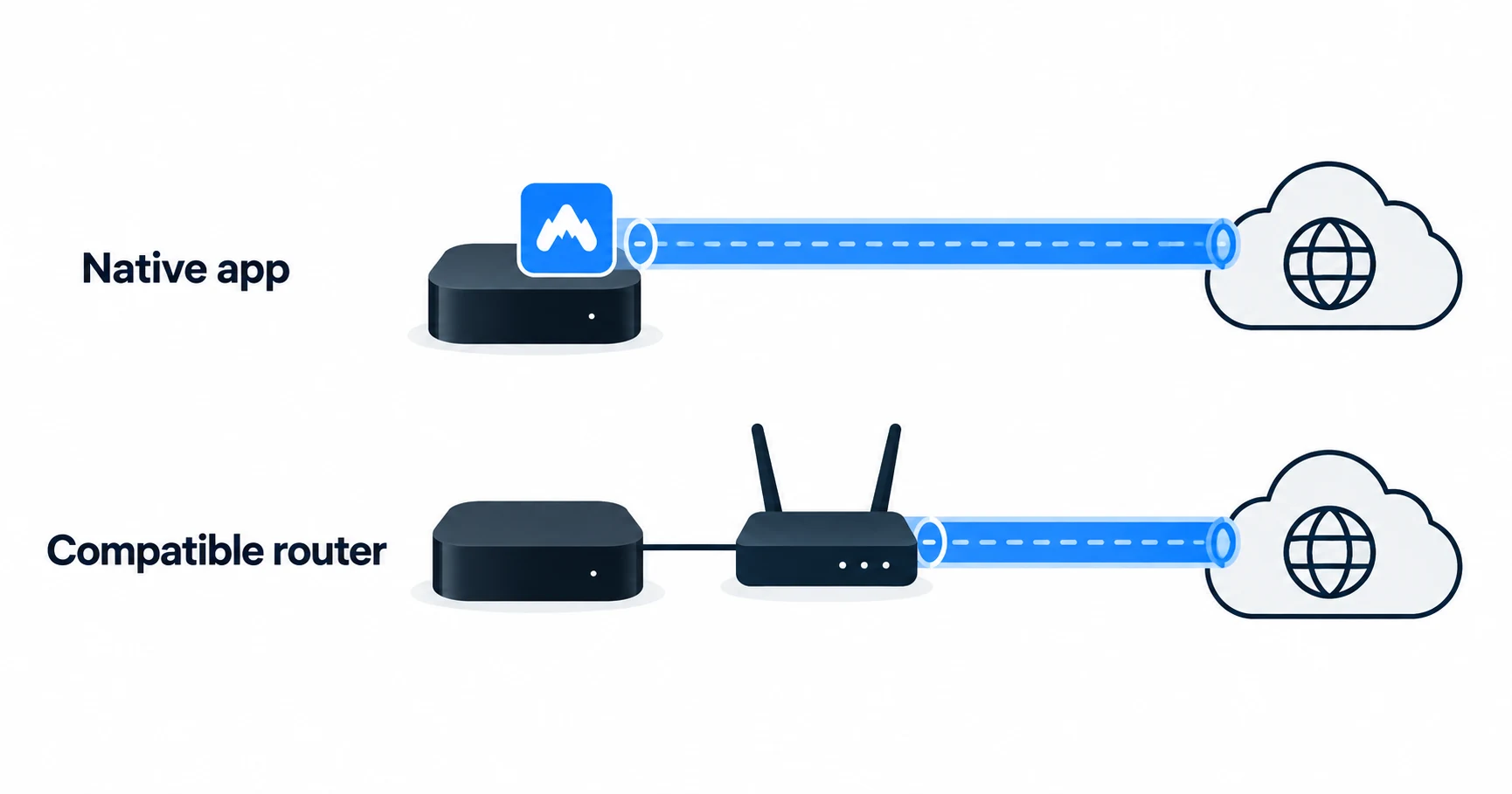
Four questions that prevent the wrong purchase
| Question | What to establish | What does not prove compatibility |
|---|---|---|
| Which device do you own? | The actual Apple TV hardware model | An Apple TV app installed on another smart TV |
| Which operating system can it run? | Support for the VPN app's minimum tvOS version | Having a recently purchased subscription |
| Is the app available? | The provider's official app for your supported device and store | A VPN app on your iPhone |
| Which plan unlocks it? | The provider's tvOS subscription requirement | A free account that works on a laptop |
These checks are deliberately separate. App compatibility, account eligibility and access to a particular streaming service are three different questions. Passing the first two does not guarantee the third.
Two documented native-app options
Surfshark: check the supported Apple TV model
Surfshark's Apple TV page identifies HD and 4K hardware with tvOS 17 or later. Its guidance points owners of older devices toward a router-based method. The model and software requirement are the useful first filters. After those checks, review the current VPN plan and household use terms.
Proton VPN: the free account is not sufficient for tvOS
Proton's Apple TV support article specifies a paid VPN subscription. This is easy to miss if you already use Proton's free service on a phone or computer. Confirm that the intended account has the required VPN access before installing the TV app.
We have not tested streaming playback, remote-control usability or reconnection on these apps. The comparison establishes published compatibility and plan requirements. It does not rank picture quality or give either provider a made-up performance score.
When a router is worth considering
A router running a VPN client can route traffic for a connected television device without a VPN app on that device. Whether this works depends on the router's model, firmware and supported client method. A setting labeled “VPN server” is not enough; that function usually serves a different purpose.
This option may help with older hardware, but it has costs beyond the VPN subscription. You must administer the router, confirm which devices follow the VPN route and understand what happens if the tunnel disconnects. Do not replace a working router solely because a comparison chart says “router compatible” without naming the supported method.
The router compatibility checklist explains how to distinguish a VPN client from a server using one provider's documented examples. Apply the same model-and-firmware discipline to whichever provider you consider.
What a VPN does not guarantee on Apple TV
A VPN subscription does not include a streaming subscription. It also does not change the billing country, account rules or viewing rights of a streaming service simply because the device uses a different network exit.
Services can restrict VPN traffic, and access can change. Avoid purchasing on a promise that every catalog or event will always work. If a particular service matters, review its rules and the VPN provider's current support guidance, then assess the service during any evaluation period that actually applies to your purchase. If Netflix displays a proxy error, use the Netflix proxy-error guide to distinguish that service response from an installation problem.
For broader viewing requirements across devices, use our streaming VPN comparison. A Fire TV device follows a different installation path; the guide to installing NordVPN on Fire TV should not be used as tvOS instructions.
Keep the purchase check short
Write down the model, installed tvOS version, intended VPN plan and streaming service. Check the app requirement against that list. Then read the total initial charge, renewal term and refund conditions for the store or website taking payment. A provider's direct-purchase policy may not describe an App Store transaction.
If the app is compatible, test the normal tasks you care about: connecting, choosing an available location, reopening after standby and using your existing streaming account. These are suggested checks for the reader, not tests performed for this article.
Apple TV VPN questions
Buy after the compatibility check
A native app is the simplest option to investigate when your Apple TV meets its requirements. Compare Surfshark's supported models with Proton's hardware and paid-plan conditions, then select for your viewing and household needs. If the device is too old, establish a workable router method before paying.
Sources
Provider statements are attributed below. Publication dates and current availability can differ; the review date records when the cited documentation was examined.
- Proton VPN Support: Apple TV requirements
Reviewed October 14, 2026. - Surfshark: Apple TV VPN compatibility
Reviewed October 14, 2026. - NordVPN: Apple TV app
Reviewed October 14, 2026.