

Streaming
Best VPN for streaming in 2026: 4 privacy-first picks

Editorial illustration; device interfaces are illustrative, not provider screenshots
The best VPN for streaming protects a connection on hotel Wi-Fi, supports the devices you already own, and explains its limits honestly. It cannot create viewing rights, guarantee a regional catalog, or override a platform’s account and location rules. We compared four providers by privacy evidence, app coverage, router options, connection limits, and current support documentation.
Quick verdict
NordVPN is our overall pick because it combines ten connections, broad app support, SmartPlay, specialty servers, and six no-logs assurance engagements.
Surfshark is the household alternative when unlimited simultaneous VPN connections matter. Proton VPN is the transparency-led choice with open-source apps and five annual public no-logs audits. ExpressVPN is the strongest editorial alternative for router users and now supports 10, 12, or 14 connections depending on tier. None of these services guarantees playback or a different catalog. Netflix, Hulu, Disney+, sports platforms, and broadcasters control availability. Use a VPN for connection privacy and legitimate travel only when that use fits the service terms.
Our research methodology
VPNVertex does not claim private hands-on access tests. We reviewed provider trust centers, audit reports, device and router documentation, connection limits, Smart DNS support, refund terms, and the help pages of major streaming services. Current official documentation receives more weight than anonymous success reports.
Streaming behavior changes by account, location, plan, device, app version, and platform policy. A result reported by one reviewer is not a promise for every reader. Our research methodology explains how we separate auditable facts from temporary observations.
What matters in a streaming VPN
Device support. Start with the TV, phone, computer, streaming stick, or router you actually use. A large server network does not help if the app is unavailable on the target device.
Connection limits. NordVPN and Proton VPN allow ten simultaneous VPN connections. Surfshark allows unlimited connections under its fair-use policy. ExpressVPN allows 10 on Basic, 12 on Advanced, and 14 on Express Pro.
Stable nearby servers. A nearby server usually adds less latency than a distant one. Server totals and countries change, so use the provider’s live location list rather than a copied number when choosing.
Router and TV options. Native TV apps are simpler than router configuration. ExpressVPN maintains a router app and Aircove hardware. NordVPN and Surfshark document compatible-router setups. Surfshark ended Smart DNS support on February 2, 2026.
Honest limitations. A VPN protects the network path. It does not change subscription rights, billing country, home-location settings, GPS data, or a platform’s licensing rules.
Why a streaming service may detect a VPN
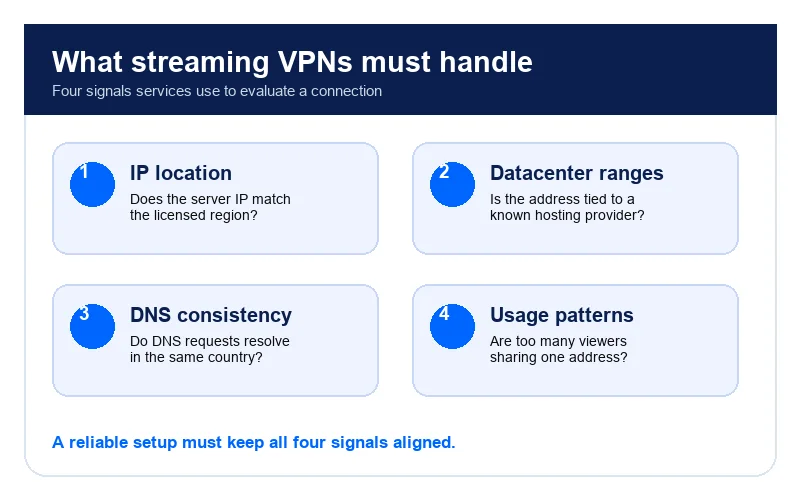
A platform can compare the visible IP address with account region, billing information, device location, home-network rules, or known hosting ranges. It can also identify a heavily shared address used by many accounts. The exact systems are not public, so claims that a VPN can always defeat them are speculation.
Netflix’s current help documentation says a VPN may restrict the viewer to titles licensed worldwide. It also says VPN connections are not supported for live events or the ad-supported experience. The recommended fix for seeing the normal local catalog is to turn off the VPN.
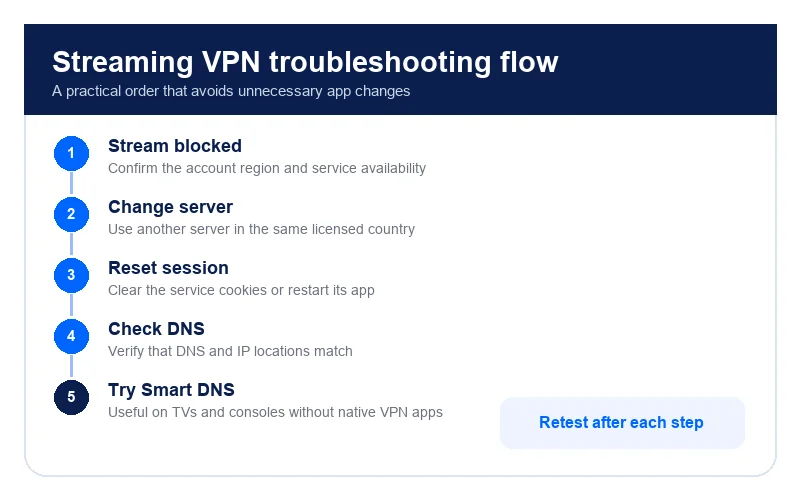
If a legitimate viewing session fails, check the service status, subscription tier, home-location settings, device permissions, app updates, and the platform’s official troubleshooting guidance. Our Netflix proxy-error guide follows that support-first approach.
The 4 best VPNs for streaming privacy in 2026
| VPN | Best fit | Connections | TV and router note | Main limitation |
|---|---|---|---|---|
| NordVPN | Best overall | 10 | TV apps, SmartPlay, router guides | No playback guarantee |
| ExpressVPN | Router-focused homes | 10, 12, or 14 | Router app, Aircove, MediaStreamer | Features vary by tier |
| Surfshark | Many personal devices | Unlimited under fair use | TV apps and router setup | Smart DNS discontinued |
| Proton VPN | Public audit transparency | 10 on paid plans | Apps for supported TV platforms | No consumer Smart DNS |
1. NordVPN: best overall
NordVPN pairs broad device support with SmartPlay, ten simultaneous connections, and specialty-server options. Its no-logs practices have undergone six independent assurance engagements, with Deloitte reviewing systems operating in late 2025. That evidence supports the privacy recommendation; it does not certify streaming access.
Choose NordVPN if you want one account across common desktop, mobile, and TV platforms and prefer a mature router-support library. Read our NordVPN review for the audit and feature details. If Netflix specifically is your main use case, our dedicated guide on whether NordVPN still works with Netflix in 2026 covers the current state of that pairing in more depth.
2. ExpressVPN: best router experience
ExpressVPN offers a router app, Aircove hardware, MediaStreamer DNS functionality, and 10 to 14 simultaneous connections depending on tier. Its KPMG assessments cover TrustedServer and privacy-policy controls, while separate reports examine apps and Lightway.
MediaStreamer is not a VPN and does not encrypt traffic. ExpressVPN remains editorial only on VPNVertex because its affiliate link is not approved.
3. Surfshark: best for many devices
Surfshark supports unlimited simultaneous VPN connections under its fair-use policy. Deloitte issued no-logs assurance reports in 2023 and 2025, and the provider maintains apps for major TV platforms.
Surfshark discontinued Smart DNS on February 2, 2026. For an unsupported TV, its documented alternatives are a VPN-protected hotspot, a compatible router, or a supported TV app.
4. Proton VPN: best public audit trail
Proton VPN publishes its Securitum no-logs reports and makes its apps open source. Paid plans support ten devices and include access to the full paid-server network. The free plan is useful for basic privacy, but features and server choice differ from paid service.
Proton is the strongest choice here when publicly readable audit evidence matters more than Smart DNS or router convenience.
Streaming-service guides and their limits
| Service or issue | What to verify first | VPNVertex guide |
|---|---|---|
| Hulu while traveling | US subscription, supported location, home-network rules | Hulu travel guide |
| Disney+ | Account region, app availability, Error 73 or 83 | Disney+ privacy and travel guide |
| BBC iPlayer | UK availability and TV Licence requirements | BBC iPlayer guide |
| ESPN+ | Subscription, local blackout rules, location permissions | ESPN+ privacy guide |
| Netflix VPN message | Plan type, live-event limits, detected location | Netflix VPN troubleshooting |
These guides explain official limitations and troubleshooting. They do not promise a different catalog or a way around a blackout.
What to expect from major platforms
Netflix openly documents reduced availability while a VPN is active and does not support VPN use for live events or its ad-supported experience. Other services may enforce household, home-network, GPS, billing, or travel rules differently.
A playback failure can come from an expired subscription, unsupported plan, stale app, device clock, DNS cache, account region, home-location setting, or service outage. Treat the VPN as one possible cause, not the automatic explanation.
For live sport, blackouts are licensing rules tied to location and event rights. A VPN does not grant permission to evade them. Check the league, broadcaster, and streaming-service documentation for lawful viewing options.
Streaming on TVs, sticks, consoles, and routers
Install the provider’s native app when the TV platform supports it. Native apps preserve VPN encryption and are easier to update than a manual router configuration.
If the device lacks an app, a compatible router or VPN-protected hotspot can route its traffic. ExpressVPN also offers MediaStreamer DNS functionality. NordVPN’s SmartPlay works through supported apps and its Smart DNS documentation. Surfshark Smart DNS must not be used because support ended in February 2026.
A router protects every device behind one tunnel, but all household members then share the same VPN location. Banking, local channels, work systems, and smart-home services may need a normal route. Plan those exceptions before moving the whole network.
VPN vs Smart DNS for streaming devices
A VPN encrypts traffic and changes the visible IP address. Smart DNS changes selected DNS routing but does not provide VPN encryption or the same IP-hiding behavior. It is a device-compatibility tool, not a privacy substitute.
Use a native VPN app for privacy on supported devices. Consider current Smart DNS documentation only when a device cannot run the app and the provider still supports that feature. Avoid old setup guides because retired DNS addresses can break connectivity.
Our VPN vs proxy vs Smart DNS guide explains the technical differences without labeling any option a guaranteed unblocking tool.
Can a free VPN support streaming?
A reputable limited free plan can protect a connection, but it may restrict servers, speed, data, or device features. That does not make every free VPN unsafe. The real warning signs are unclear ownership, invasive permissions, weak privacy documentation, embedded tracking, and no credible security review.
Choose from evidence rather than assuming paid always means safe or free always means dangerous. Our free VPN safety guide provides a practical checklist.
How to use a VPN for streaming privacy
- Confirm that the subscription, plan, country, and device are supported by the streaming service.
- Install the VPN from the official app store or provider website.
- Connect to a nearby server that reflects your legitimate location or travel needs.
- Open the streaming app and test content included with your subscription.
- If playback fails, follow the platform’s official troubleshooting before changing locations repeatedly.
- Disable the VPN if the service requires the normal local connection or does not support VPN use.
Is streaming with a VPN legal?
General VPN use is legal in the United States. That does not override copyright law, territorial licensing, account eligibility, blackout rules, or a platform’s terms. Legal use and contract compliance are separate questions.
Do not assume enforcement is always limited to a proxy error or that an account can never be restricted. Read the current terms for the service and country involved. A VPN is best treated as a privacy tool for a connection you are already entitled to use.
Best VPN for streaming FAQ
Final verdict
NordVPN is our best overall VPN for streaming privacy because it balances device coverage, ten connections, SmartPlay, specialty features, and repeated audit evidence. Surfshark is the better household choice when unlimited simultaneous connections matter.
Choose neither on the promise of a foreign catalog or guaranteed playback. Verify the platform’s rules, use content included with your subscription, and test the provider on your actual devices within the applicable refund terms.
If a platform still returns a location or proxy message after all that, work through the service's own support path before changing provider. Our Netflix proxy-error guide lays out that support-first sequence and the point at which the VPN may not be the cause.