

Education
Obfuscated VPN explained: Stealth modes compared (2026)
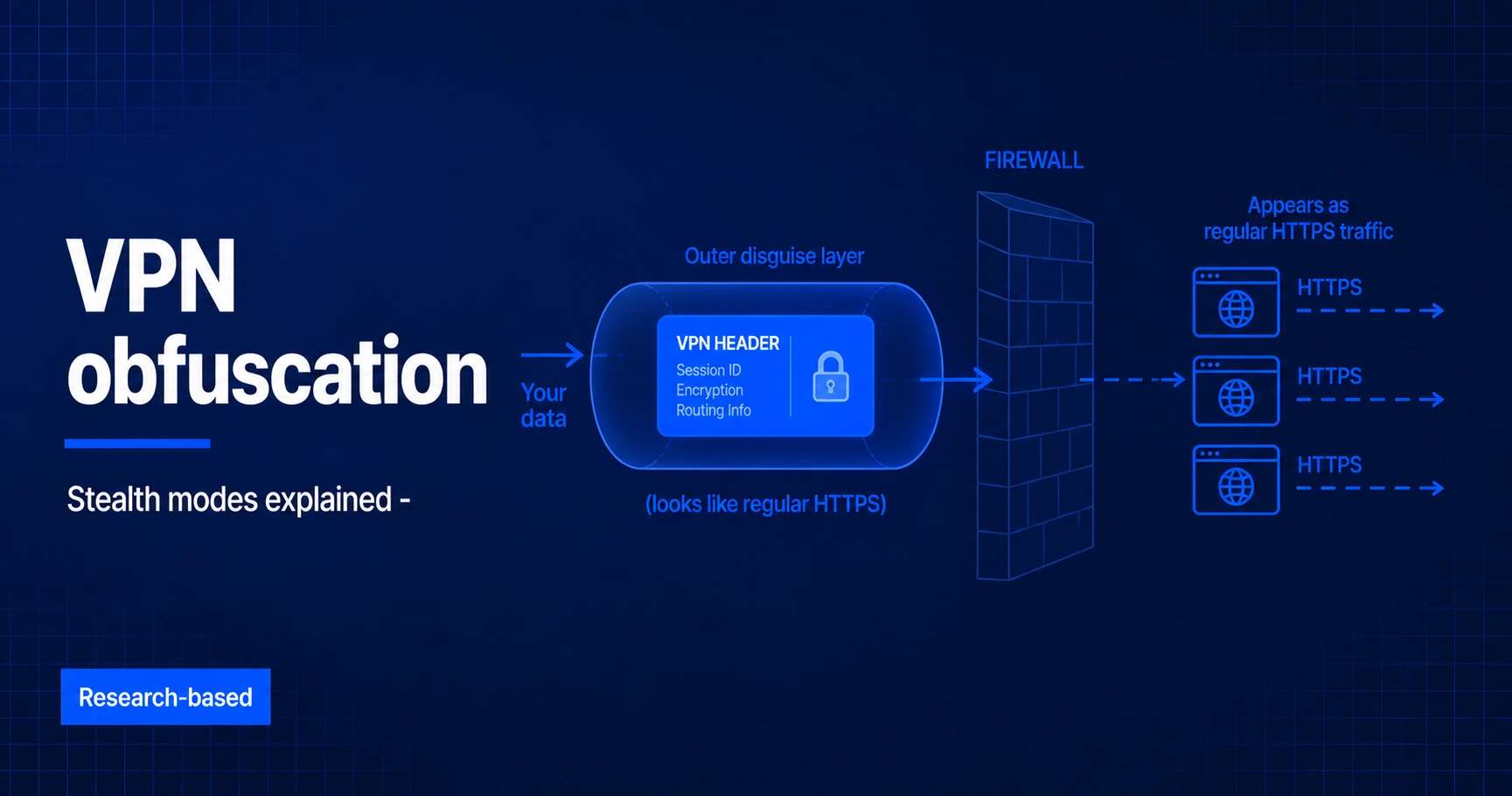
An obfuscated VPN attempts to make VPN traffic less recognizable to network filtering systems. It can help when a school, workplace, hotel, internet provider, or national network blocks common VPN protocols. It does not make a connection invisible, guarantee access, or replace checking local laws and network rules. This guide explains the main approaches and compares the documented stealth features from NordVPN, ExpressVPN, Surfshark, Proton VPN, and Windscribe.
The short answer
Obfuscation adds a transport or protocol layer that changes recognizable VPN patterns.
Some implementations wrap traffic in TLS, some alter packet characteristics, and others use provider-specific transports. These methods can reduce detection by basic or moderate filtering, but advanced traffic analysis may still identify or block them. The result depends on the provider, app, protocol, server, and network. No obfuscated VPN is guaranteed to work on every restricted network. Follow local law, workplace or school policy, and the terms of any service you access.
How this comparison was researched
This guide compares current public documentation from the providers and protocol projects named below. It describes documented behavior rather than claiming private laboratory testing. Features can change by operating system, app version, server, and location, so confirm current setup instructions before relying on a specific mode.
What VPN obfuscation actually is
A standard VPN connection encrypts the contents of every packet between your device and the VPN server, then routes the traffic through a tunnel. The encryption is strong, and the contents are unreadable to anyone watching. But the traffic itself has a recognizable shape. Packet sizes, port numbers, protocol headers, and handshake patterns combine to form a fingerprint that DPI systems can identify with high confidence.
Network operators who want to block VPN traffic (the Great Firewall, some Middle East countries, some corporate networks, some streaming platforms, some ISPs throttling specific protocols) do not need to break the encryption. They just need to identify the traffic as VPN traffic and drop or slow it.
Obfuscation defeats this by reshaping the traffic so the fingerprint disappears. The most common technique wraps the VPN connection inside a layer of TLS (the same protocol that powers HTTPS), which makes the traffic indistinguishable from any web browser connecting to a secure website. A network operator who wanted to block obfuscated VPN traffic would have to block all HTTPS traffic, which is operationally impossible for most networks.
Common obfuscation approaches
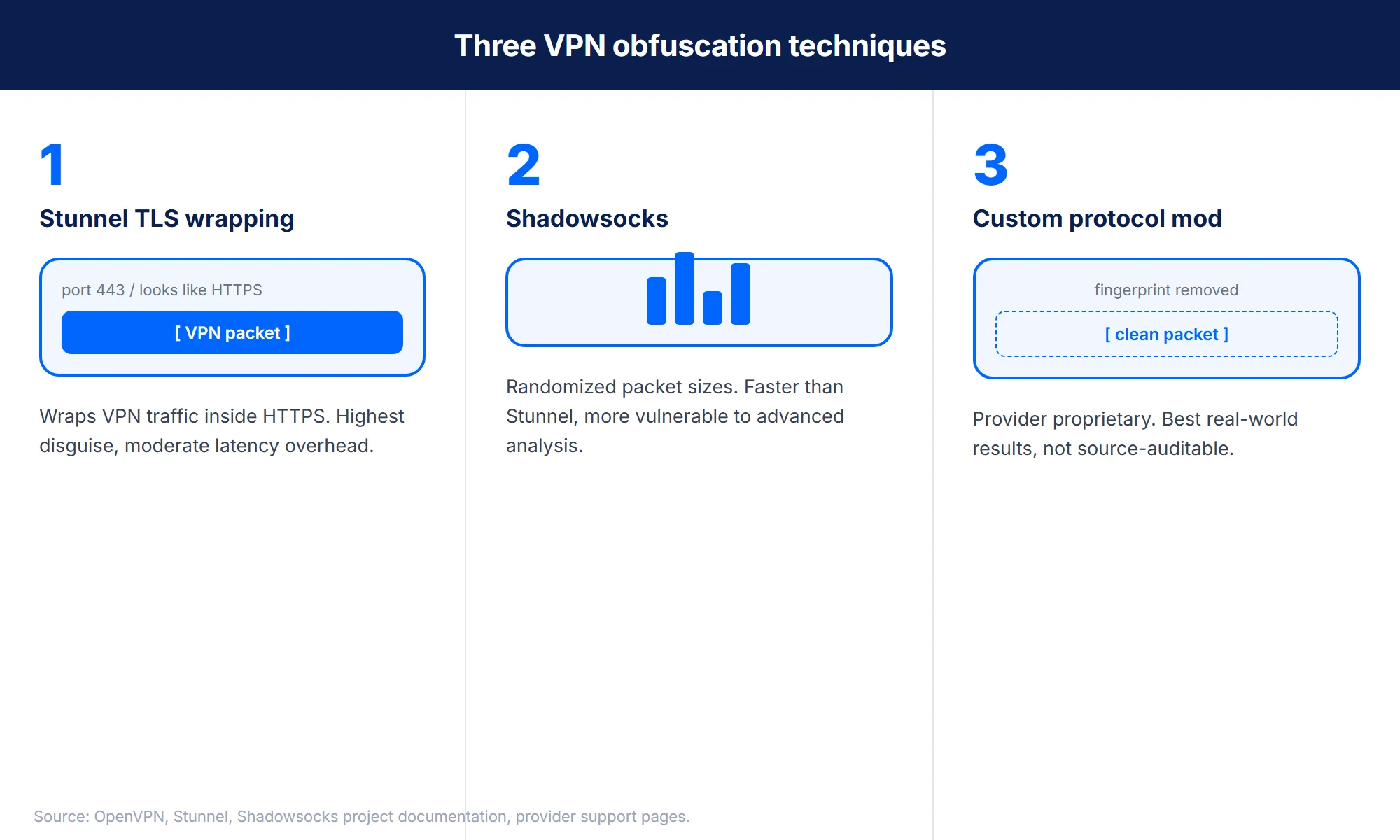
There is no single universal obfuscation method. Common examples include:
- TLS wrapping. A VPN tunnel is carried inside a TLS transport, often over TCP port 443. It can resemble encrypted web traffic, but timing, packet size, and handshake patterns may still reveal differences.
- Protocol and packet modification. A provider changes recognizable headers or connection behavior. Details are often proprietary and effectiveness varies by network.
- Proxy-based transports. Shadowsocks is an encrypted proxy, not a VPN protocol. It can carry selected traffic through restrictive networks and may be combined with other transports.
When you actually need VPN obfuscation
Five contexts where obfuscation is genuinely necessary, and three where it is overkill.
When you need it
- Behind the Great Firewall (China). State-level DPI blocks every recognizable VPN protocol. Obfuscation is the only way to connect from inside China consistently. Our best VPN for China guide covers this case in detail.
- In a country with state-level VPN bans. Russia, Iran, Turkey, UAE, and several smaller jurisdictions periodically block specific VPN protocols. Obfuscation routes around the block until it is detected and patched.
- On a corporate network that blocks consumer VPN protocols. Many enterprises block OpenVPN UDP port 1194 and IKEv2 ports 500 and 4500 at the firewall. Obfuscation on port 443 looks like any web browser session and passes through.
- On campus or hotel Wi-Fi with DPI. Some networks throttle or block VPN traffic to manage bandwidth or comply with content-filtering policies. Obfuscation bypasses the throttling.
- On an ISP that throttles VPN traffic. Some ISPs slow video streaming or P2P traffic when they detect it through a VPN. Obfuscation hides the VPN signal and prevents the protocol-specific throttling.
When obfuscation is overkill
- General privacy use on home Wi-Fi. A standard VPN connection on WireGuard or OpenVPN UDP is sufficient. Obfuscation adds latency without adding meaningful privacy.
- Streaming geo-unblock in countries without VPN restrictions. Netflix, Disney+, and similar services detect VPN traffic at the IP layer, not the protocol layer. Obfuscation does not help against IP detection.
- Public Wi-Fi at a coffee shop or airport. Standard VPN encryption protects against the man-in-the-middle threat model on public Wi-Fi. Obfuscation is not needed unless the Wi-Fi explicitly blocks VPN protocols.
Provider stealth modes compared
NordVPN Obfuscated Servers
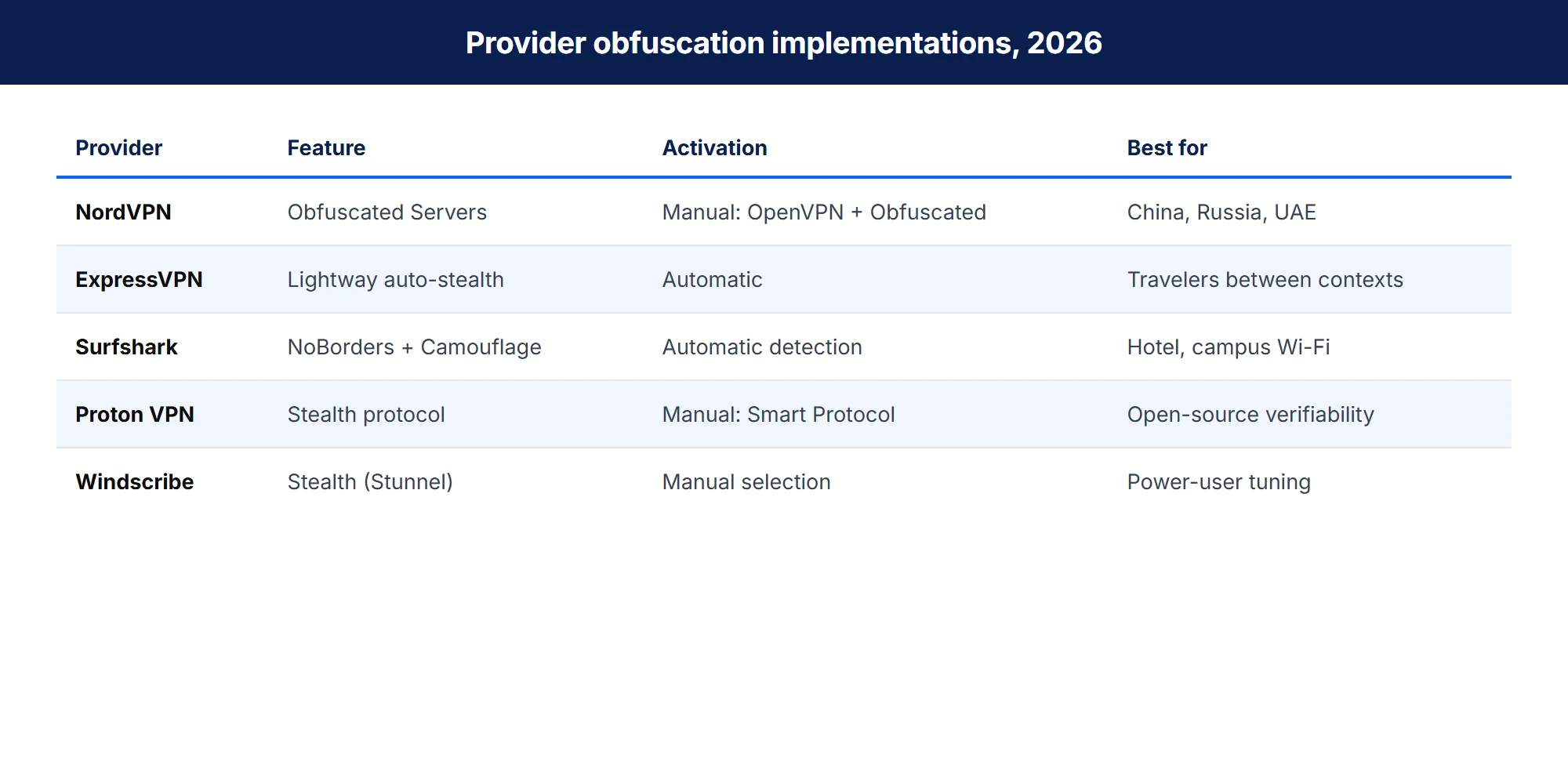
NordVPN provides a separate Obfuscated Servers category. According to NordVPN support, these servers require OpenVPN TCP or UDP and do not operate with NordLynx. Availability and menus vary by operating system. This explicit category provides manual control, but switching away from NordLynx may reduce speed.
ExpressVPN obfuscation
ExpressVPN says obfuscation is available across its server network, without a separate stealth-server category. However, its Lightway developer documentation states that Lightway does not obfuscate traffic by default and that the client can apply obfuscation on top. Lightway is the underlying VPN protocol, while stealth behavior is a separate client-side layer whose activation may depend on the app and network.
Surfshark NoBorders and Camouflage Mode
Surfshark uses two related names that should not be treated as identical. Camouflage Mode is associated with OpenVPN obfuscation. NoBorders detects network restrictions and presents a selected server list; it can also be enabled manually. Surfshark documents NoBorders for Windows, macOS, Android, and iOS. Exact behavior can vary by platform and app version.
Proton VPN Stealth
Proton VPN documents Stealth as an obfuscated protocol using a TLS tunnel over TCP. Its protocol guide lists support on Windows, macOS, Android, iOS and iPadOS, Android TV, and the Linux GUI when Proton Protocols beta is enabled. Platform support and plan availability should be checked in the current app.
Windscribe Stealth (power-user option)
Windscribe deserves a brief mention because its Stealth protocol is among the most technically transparent. It uses OpenVPN over Stunnel on port 443, and the configuration is documented in the Windscribe knowledge base in unusual detail. Stealth is available on all Windscribe servers, both free and paid tiers. Best for: technically advanced users who want to understand exactly how the obfuscation works and tune it to specific network conditions.
Stealth is one frontier; future-proof encryption is another, covered in our post-quantum VPN guide.
FAQ
Bottom line
An obfuscated VPN is a troubleshooting option for networks that recognize or block ordinary VPN connections. It can reduce obvious protocol signals, but it cannot guarantee invisibility, access, or safety from legal consequences.
Choose an implementation that matches your device and network. NordVPN offers a manual OpenVPN-based server category, Proton VPN exposes a documented Stealth protocol, Surfshark combines Camouflage Mode with a separate NoBorders workflow, and ExpressVPN applies a client-side obfuscation layer without a dedicated stealth-server list. Confirm current provider instructions before travel or use on a restricted network. When a block follows the exit address rather than the protocol, obfuscation is the wrong tool; our residential VPN guide explains what changes when the exit comes from a home connection instead of a data center.