

Education
What is a residential VPN? Explained simply (2026)
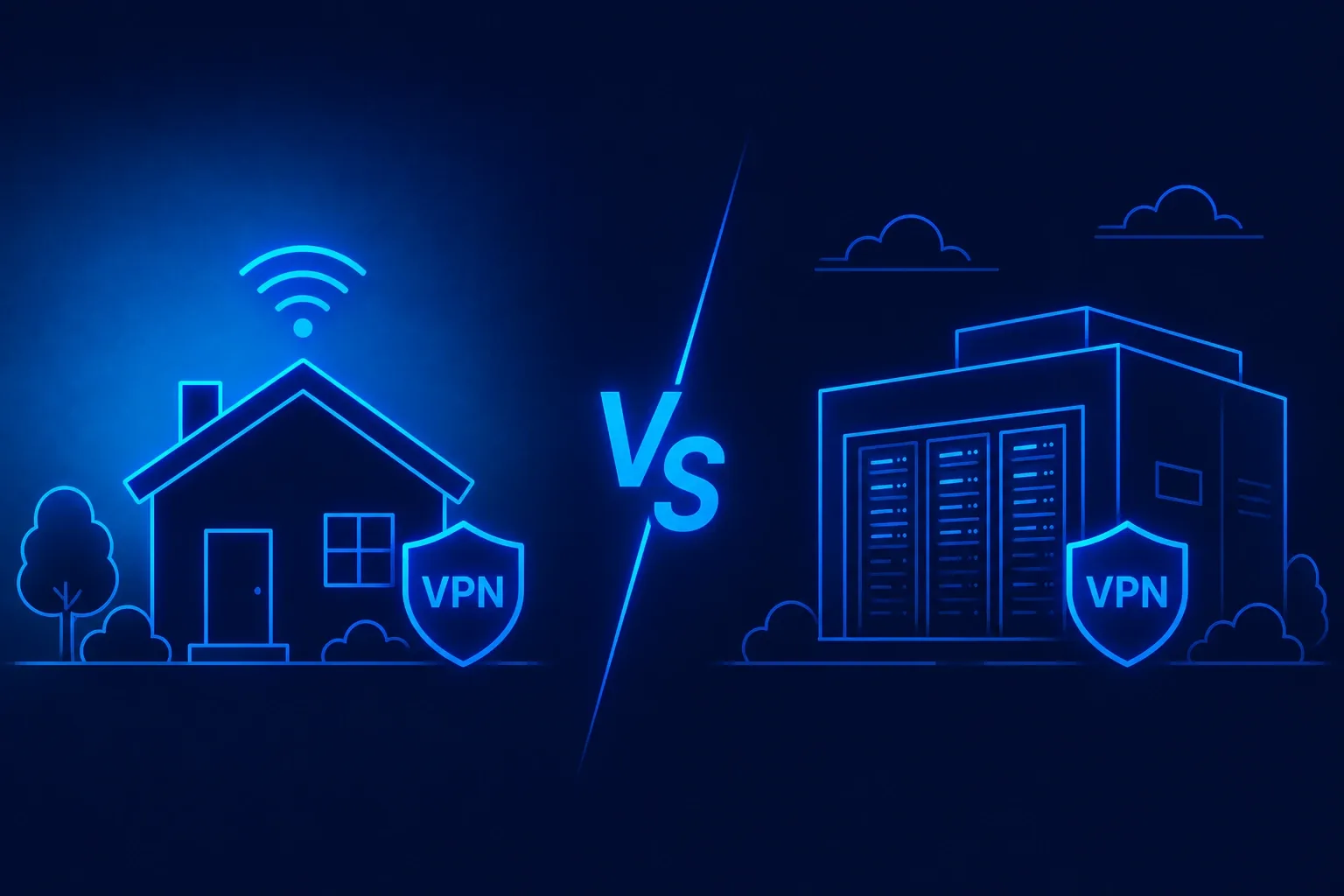
A residential VPN routes your traffic through IP addresses that belong to real home internet connections, not through a commercial data center. That single change flips how websites see you. Banks, ticket sites, and streaming platforms treat the connection as if it came from a normal household on Comcast, Spectrum, or AT&T. This guide walks through what the service actually is, how it differs from a regular VPN, a dedicated IP, and a proxy, and when you should (and should not) pay the premium.
What is a residential VPN?
A residential VPN is a virtual private network service that assigns you an IP address issued by a home internet provider. Instead of exiting through a rack in a Frankfurt or Ashburn data center, your traffic exits through a real DSL, cable, or fiber line registered to a household. To any website checking the IP, you look like a person at home, not a bot in a colocation facility.
An everyday analogy: a regular VPN is like checking into a hotel, where the room number is clearly commercial and any package delivered there is flagged as transient. The home-sourced kind is like renting a spare bedroom on a quiet suburban street. The address looks lived-in and no one at the door knows you are just passing through.
The technical stack is otherwise the same. You install a client, it opens an encrypted connection to a server, DNS queries route through that server. The difference is upstream: your session is bounced through an IP that belongs to a home subscriber, either by an SDK on a partner app, a peer-to-peer network, or a leased IP block. That last mile is what makes the product worth ten to a hundred times the price of a normal one.
Residential VPN vs regular data-center VPN
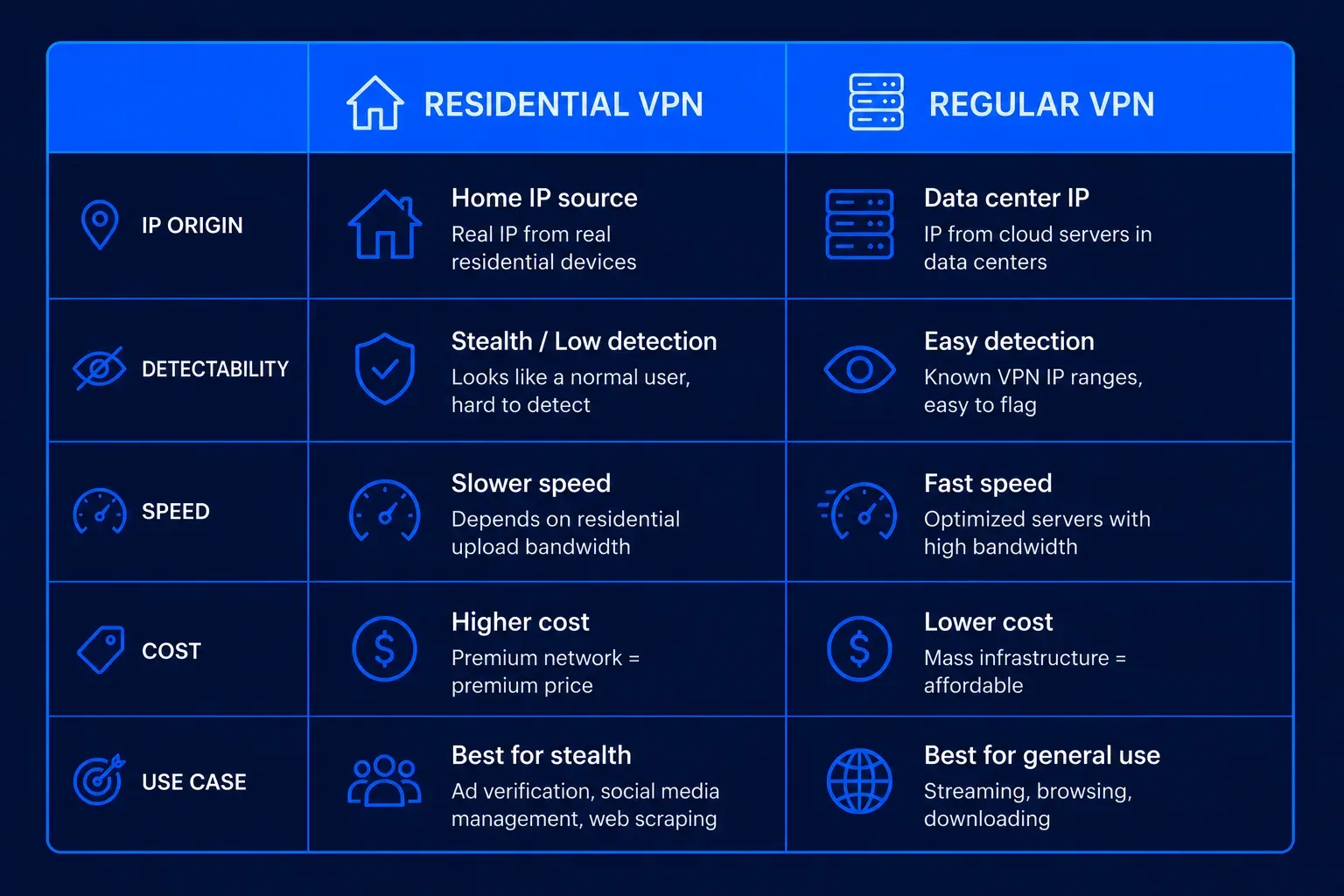
The regular VPNs most people know, the ones with $3 monthly plans, run on commercial data-center IPs. Fraud-prevention services like MaxMind, IPQualityScore, and Spur maintain lists of every known data-center range. When Netflix or Chase Bank checks your IP against those lists, a data-center match triggers a soft or hard block.
Here is where the two options diverge:
- IP source. Regular: OVH, Hetzner, or Amazon. Home-sourced: a Comcast, Spectrum, or KDDI subscriber line.
- Detection profile. Data-center IPs are flagged in almost every fraud database. Home IPs are effectively clean, because blocking them would block real customers.
- Speed. Regular: 200 to 900 Mbps on WireGuard. Home-sourced: 5 to 50 Mbps, capped by the household's upload.
- Price. Regular: $3 to $12 per month, unlimited data. Home-sourced: $50 to $500 per month, metered by gigabyte.
- IP pool size. Regular: thousands of servers in 60 to 100 countries. Home-sourced: millions of rotating IPs.
- Legal exposure. Regular: mature market, clear consumer contract. Home-sourced: some pools were built with dubious consent, covered below.
If you only need privacy on public Wi-Fi or want to change your Netflix region, the premium format is overkill. If a site keeps blocking you after two or three regular tunnels, it is probably filtering data-center ranges, and this is one of the few tools that gets past. For a primer on ordinary tunnels, see our what is a VPN explainer.
Versus a dedicated IP VPN
People confuse the home-sourced product with a dedicated IP add-on because both promise "an IP nobody else uses." They are not the same thing. A dedicated IP from a mainstream provider still gives you a data-center address. It just gives you one that only you use, instead of one shared with 500 other subscribers. Sites that block by IP range will still see a hosting provider's ASN and can still block you.
The home-sourced option, by contrast, gives you a real ISP IP that may or may not be dedicated. Some providers sell "static" plans where the same house IP is yours for weeks. Others rotate you through a new address every request. Either way, the IP resolves to a real ISP, not to a hosting company.
Rule of thumb: pick a dedicated IP when you want to whitelist yourself into a corporate portal, a home NAS, or a game server, and you control the receiving end. Pick the home-sourced product when the receiving end is a third-party website hunting for data-center traffic. Businesses that need a stable, whitelistable address without the premium should look at a proper dedicated IP VPN for business first.
Versus a residential proxy
A residential proxy sounds similar but works at a different layer. The VPN version encrypts every packet leaving your device and forces all applications through the tunnel. A proxy sits in front of a single application, usually a browser or a scraping script, and only routes that app's traffic through a home IP. Everything else on the machine uses your normal ISP.
Two practical consequences follow. The proxy leaves your other traffic exposed, which matters if you also want privacy. And it does not encrypt end to end the way a tunnel does; you rely on HTTPS at the application layer. For a formal definition, see the Wikipedia proxy server entry. Most big proxy providers (Bright Data, Oxylabs, Smartproxy, NetNut) quietly power the branded consumer products smaller brands sell. If a $75 per month plan ships with a Chrome extension only, it is almost certainly a proxy in disguise.
How residential VPN providers source their IPs
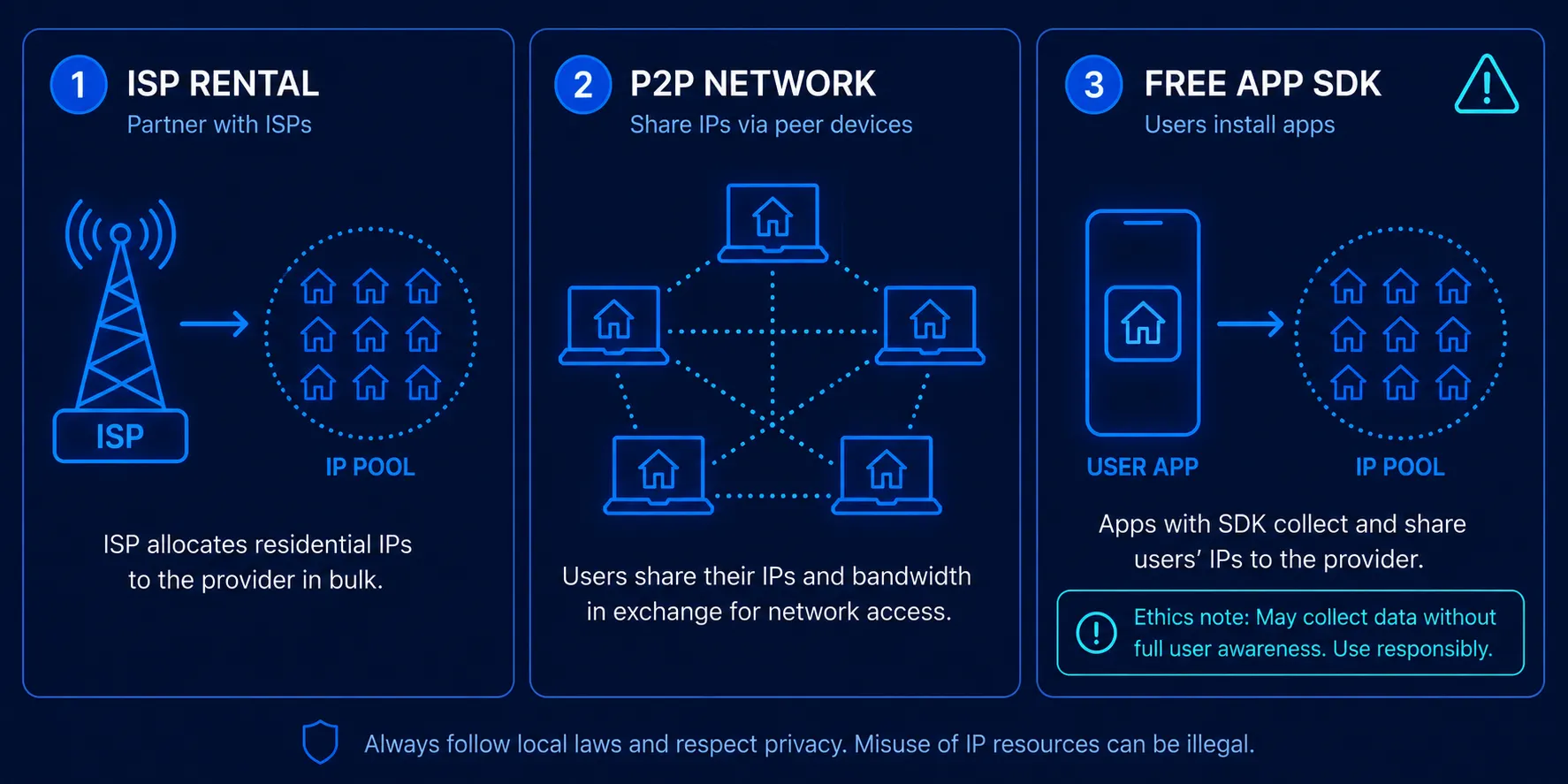
Home IPs are not something a provider can buy at wholesale; real ISPs allocate them to real households. To build a pool of millions, providers use four methods, each with different ethical weight.
1. Direct IP leasing. A provider signs contracts with small regional ISPs to lease blocks of static home IPs. This is the cleanest source, but also the most expensive and the smallest in volume.
2. Affiliated app SDKs. A provider pays mobile app developers to embed an SDK that turns each installed device into an exit node while the app is running. Users are supposed to opt in, but the consent screen is often buried in a paragraph of terms that promises "free premium features in exchange for sharing unused bandwidth." Honeygain, Pawns.app, and IPRoyal Pawns work this way on the seller side.

3. Peer-to-peer networks. A provider gives away a free VPN whose users become exit nodes for paying customers. Hola made this model infamous when it was caught in 2015 selling its free users as a botnet through its sister company Luminati (now Bright Data). Most reputable networks have since moved to explicit opt-in models.
4. Grey-market resale. Smaller brands buy access from larger providers and mark it up. Legal, but this is where the shadiest pools live.
The ethical question, covered well by the EFF privacy program, is whether the household whose IP you borrow understood the trade. When someone rents an IP to scrape a competitor's pricing page, a real home connection is technically making that request. If it triggers a fraud investigation, the household may end up on the suspect list, not the buyer.
When you actually need a residential VPN
Most people do not. A regular tunnel handles Wi-Fi privacy, geo-shifted streaming, and casual censorship circumvention. The premium format earns its price in a narrow set of scenarios, mostly commercial:
- Banking access from abroad. Some US banks flag any data-center login and force a phone verification loop that never completes overseas. A home-sourced US IP defuses the flag.
- Airline and hotel pricing research. Fares vary by exit country. Data-center IPs get scraper-flagged prices; home IPs get the real consumer price.
- Ticket resale and sneaker drops. Ticketmaster, Nike SNKRS, and Supreme block data-center ranges during drops. Home IPs slip past that first defense (though not the CAPTCHA layer).
- Ad verification and market research. Agencies see the exact ads a target city's consumers see, without ad networks detecting a survey rig.
- Localized SEO checks. SEO teams verify SERP layouts as a real Portland or Miami household sees them.
- Streaming stubborn regions. A few platforms (some cricket streams, some Japanese services) block all commercial ranges.
When you do NOT need one: general privacy on your home connection, blocking trackers, unblocking a Netflix library that ExpressVPN or NordVPN already handles, torrenting (a home IP puts a real household in the abuse-report chain), or gaming (5 to 50 Mbps and high latency will ruin your ping). If your goal is bypassing a firewall in a censored country, a regular tunnel with obfuscation features is the right tool.
Drawbacks of the format
Four downsides make this a poor default choice.
Cost. The cheapest plausible plans start around $50 per month for 5 to 10 GB of traffic. Business tiers run $150 to $500 per month and still meter by gigabyte. A regular tunnel gives you unlimited data for less than $5. That is a 10 to 100 times premium purely for the IP profile.
Speed. A home IP is only as fast as the household's upload pipe. Most US cable connections have 10 to 35 Mbps upload; expect 5 to 50 Mbps in practice. Streaming 4K works; downloading large files does not.
Reliability. Households turn off routers and switch ISPs. IPs drop in and out of pools constantly. Rotating plans cycle addresses; static plans offer "sticky sessions" of 10 to 30 minutes. Neither matches the five-nines uptime of a data-center service.
Legal grey zones. Viewing content is fine in most jurisdictions. Scraping a competitor's site, creating fake accounts, or evading a hard ban may violate the Computer Fraud and Abuse Act in the US or equivalent laws elsewhere. Providers put the compliance burden on you.
Top providers in 2026
The market splits into three tiers. Plain-text landscape overview, not a recommendation to buy any specific service.
Enterprise proxy platforms. Bright Data (the former Luminati), Oxylabs, and Smartproxy dominate. They sell proxy access, not consumer apps, at $8 to $15 per gigabyte with monthly minimums of $500 or more. Their compliance teams review use cases before onboarding, which is why individuals rarely get in.
Mid-market specialists. NetNut, SOAX, and IPRoyal target agencies and mid-size scraping operations. Plans run $75 to $300 per month with faster onboarding, covering 100+ countries and pools of 5 to 40 million IPs.
Consumer-facing adjacents. No mainstream consumer VPN sells a real home-sourced product, but a few come close. NordVPN's dedicated IP is a data-center address, not home-sourced, but it is stable and clean and works for many bank and streaming edge cases where a shared IP fails. Mullvad and IVPN do not touch this market at all.
If you want a consumer service that handles most stubborn streaming without the premium, our comparison of WireGuard, OpenVPN, and IKEv2 protocols and our guide to how a VPN connection works are better starting points than a $200 per month proxy plan.
Should you use one, or something else
Work down this short decision tree before spending money.
- Privacy, streaming, or public Wi-Fi safety? A regular consumer VPN. The premium format gives you nothing extra and costs 20 times more.
- Blocked on one specific site after two regular tunnels? Try a dedicated IP add-on first. If the site still blocks the ASN, the home-sourced option is the next step.
- Commercial scraping, ad verification, or price monitoring? A proxy from Bright Data, Oxylabs, or Smartproxy, not a consumer product.
- Need to whitelist a stable IP for a corporate portal or home NAS? A dedicated IP add-on.
- Buying sneakers, tickets, or Supreme drops? The tunnel is one piece of the stack; you also need a CAPTCHA solver, a headless browser, and account warming.
Most of that tree comes down to which layer you actually need to move. Our comparison of VPNs, proxies, and Smart DNS sets out what each one routes and what it leaves untouched.