

Education
NordVPN on Roku: check your router or Windows hotspot before subscribing

The streaming device must use the network route you configure.
Roku does not provide the native VPN-app installation path found on some other television platforms. NordVPN's support guidance instead points to a compatible router or a VPN-protected shared connection. Establish that network path before subscribing for Roku use.
Check the network you can actually provide
A supported router is the route to investigate when you want Roku connected without keeping a computer involved. A Windows hotspot may be another option if the computer and VPN sharing method are supported and the shared traffic actually follows the tunnel.
Turning on a VPN app on a nearby computer is not evidence that Roku uses it. Roku must connect through the correctly configured shared network. Neither method guarantees access to a particular streaming service.
How this guide was researched
This guide compares published provider documentation and the limits stated in the sources below, reviewed on October 14, 2026. Recommendations follow the specific compatibility or plan requirement explained in the article. VPNVertex has not performed device, speed, leak or streaming tests for this guide. Suggested checks are tasks for the reader, not reported test results.
Our research methodology explains how we distinguish provider statements from independent evidence.
Compare the two documented network paths
| Path | What must remain available | Best reason to choose it |
|---|---|---|
| Compatible router VPN client | A supported router and a verified rule routing Roku through the tunnel | A persistent network path for the television without keeping a laptop running |
| Windows VPN hotspot | A compatible sharing configuration and an awake, connected computer | A temporary arrangement when the computer can actually share the VPN tunnel |
This is a comparison of prerequisites, not a measured performance ranking. Roku has no native NordVPN app. A hotspot name alone does not prove VPN routing, and a DNS-only setup is not equivalent to the encrypted tunnel described here.
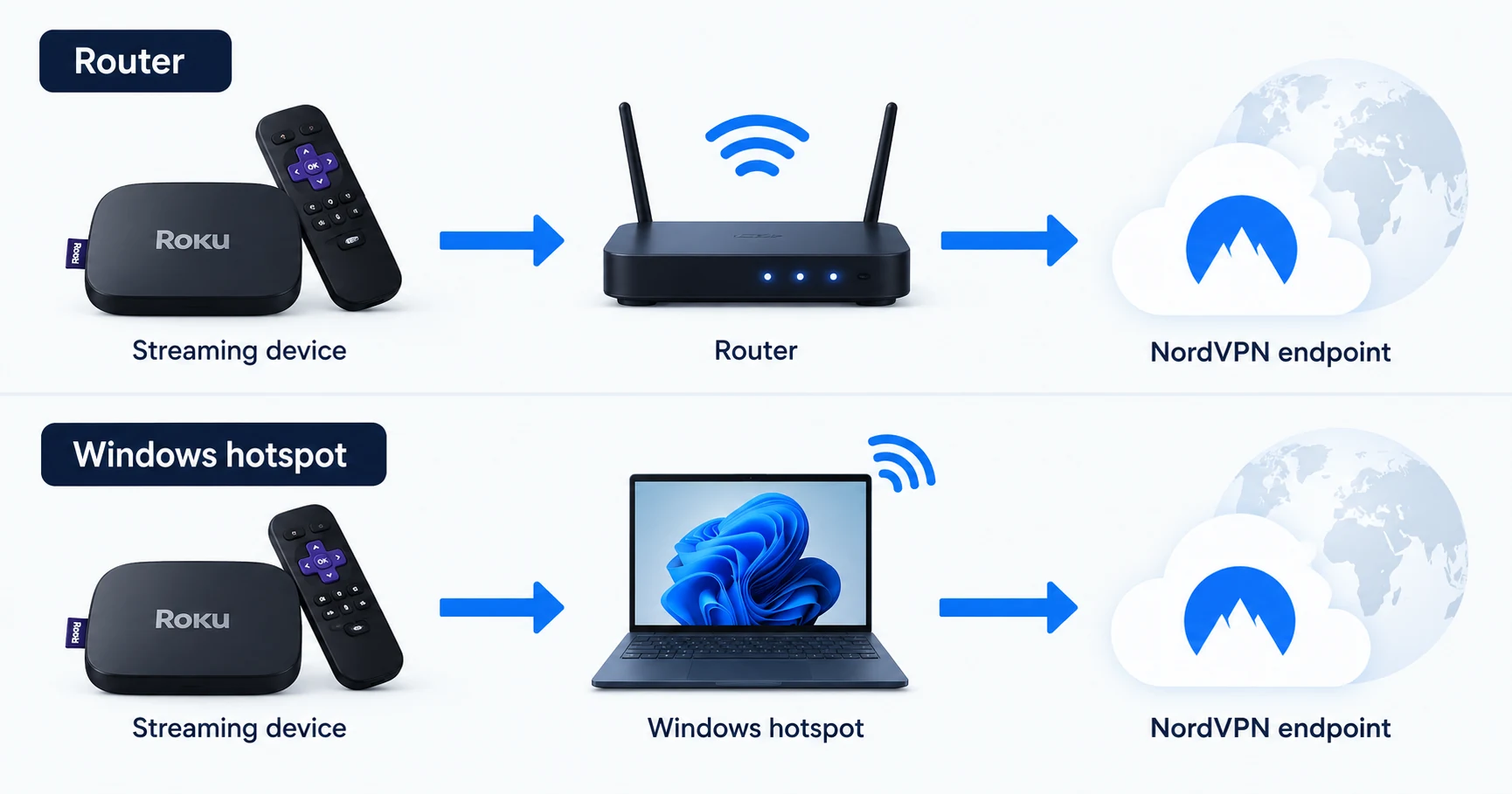
Router or Windows hotspot?
| Method | What you need | Tradeoff |
|---|---|---|
| VPN router | Exact model and firmware with a supported VPN client | Router administration and a clear device-routing policy |
| Windows hotspot | Supported sharing method, suitable adapters and a computer that remains available | The Roku connection depends on that computer and its network state |
| VPN app on an unrelated phone or laptop | No verified shared path to Roku | Does not establish Roku VPN coverage |
| Roku VPN app download | No native app route in the reviewed provider guidance | Do not subscribe expecting an ordinary Roku app installation |
NordVPN's Roku support page links to router and hotspot methods. Surfshark's Roku guidance also explains the absence of a native app. These are documented connection approaches, not successful playback tests performed by VPNVertex.
The router method begins with compatibility
Find the exact router model, hardware revision and firmware release. Check for the VPN client method supported by NordVPN. A VPN server setting, passthrough option or generic WireGuard claim is insufficient evidence for the intended configuration.
Our NordVPN router compatibility checklist explains those distinctions. It also covers why manual OpenVPN setup can require service credentials instead of the password used on the provider's website.
Once compatibility is established, determine which network Roku joins and whether that network routes through the VPN. A guest network or a device-specific exception may behave differently from the router's main connection. Record how the router behaves when the VPN disconnects.
If the household needs ordinary internet access for other devices, decide whether the router can limit the tunnel to the intended clients. Do not change the entire home's route without considering the applications other people use.
A Windows hotspot needs a verified VPN path
A Windows computer can share a connection, but the presence of a hotspot toggle does not prove that the shared traffic follows the VPN. Follow NordVPN's current sharing instructions for the supported protocol and adapter arrangement.
Roku must join the shared network created by that computer. The computer must remain powered, connected and configured to share the intended path. Sleep, a network change or an adapter change can interrupt the arrangement.
Check the provider's instructions for reconnecting and for what happens if the VPN session ends. Do not infer a working protected route solely from a browser IP check on the computer. That browser request and the Roku's traffic are different flows.
We have not configured or tested a Windows hotspot for this article. There are no claimed leak results, connection speeds or successful streaming sessions.
What changing the route does not change
A VPN does not include a Roku content subscription or override a streaming service's account terms. Account region, payment details, location requirements and VPN restrictions can still affect access. A successful network connection and a successful playback session are different checks.
Do not make account-region changes merely because a tutorial promises they will unlock a catalog. Establish the streaming service's rules and your actual viewing rights first. This guide does not recommend false registration details.
For the broader limits of streaming VPN comparisons, consult the streaming guide. A Roku setup should not inherit claims made about a provider's native app on another platform. If you are considering a DNS-only alternative, read the VPN, proxy and Smart DNS guide before treating it as an equivalent tunnel.
Answer these questions before the subscription
- Which exact network method will Roku use?
- Does the router or Windows configuration support the documented method?
- Who can administer and maintain that configuration?
- What happens after sleep, reconnection or a tunnel failure?
- Does the intended streaming service allow the use you need?
- What evaluation, cancellation and refund terms apply to the purchase channel?
If the answers require hardware replacement or an always-on computer you do not want to maintain, reconsider the setup before paying. The home VPN guide helps assess whether the household benefit justifies the configuration.
Readers considering another television platform can compare its actual app requirements in the Apple TV VPN guide. That is a compatibility comparison, not a recommendation to replace working hardware.
Roku VPN questions
Confirm the path before buying
Use a router method only when your exact hardware and firmware support it. Use a hotspot only when its shared traffic is configured to follow the VPN and its maintenance is acceptable. Start with the router checklist if you want a setup that does not depend on a running Windows computer.
Sources
Provider statements are attributed below. Publication dates and current availability can differ; the review date records when the cited documentation was examined.
- NordVPN Support: using NordVPN with Roku
Reviewed October 14, 2026. - Surfshark: Roku connection methods
Reviewed October 14, 2026. - NordVPN Support: supported router methods
Reviewed October 14, 2026.