
Education · Guide · 8 min read
What is a VPN kill switch and why you need one in 2026
What it does, how it works, when to turn it on, and the providers that ship a reliable one. A plain-English guide for anyone serious about staying private.
A VPN kill switch cuts your internet the instant the VPN drops, so your real IP never leaks during the gap. Without one, every momentary disconnect is a privacy hole. Here is how it works and who ships a reliable one.
The short answer
A VPN kill switch cuts your internet connection if your VPN drops. The purpose: prevent your real IP address from being exposed when the encrypted tunnel breaks. Without a kill switch, when the VPN disconnects momentarily (server reconnection, network change, app crash) your traffic falls back to your normal internet connection. Anyone monitoring, your ISP, the public Wi-Fi network, an advertiser tracking your activity, sees your real IP and what you do.
A kill switch sits between your apps and the internet and enforces a simple rule: no VPN, no traffic. When the tunnel comes back, traffic resumes. The interruption is invisible if reconnection is fast, or it shows as a dropped connection if reconnection takes longer.
If your VPN does not have a kill switch, your VPN does not actually protect you on a continuous basis.
Our research methodology
This guide synthesizes provider documentation, operating system networking APIs, and independent reviewer reports on kill switch reliability. Read our research methodology for the criteria and weighting we apply.
What a VPN kill switch actually does
Three behaviors define a kill switch.
Detection. It monitors the state of the VPN connection in real time. When the tunnel drops (timeout, server error, network change), the switch detects within milliseconds to seconds depending on implementation.
Blocking. It blocks all traffic that would otherwise exit through your normal internet connection. The blocking happens at the operating system network stack level, before any app can send a packet.
Resume. When the VPN reconnects, the switch unblocks traffic. The user does not have to manually restart apps in most implementations.
The user-visible effect: when your VPN is working, the internet works normally. When the VPN drops, the internet appears to stop. When the VPN comes back, the internet resumes. The privacy effect: your real IP address never appears to remote servers during the gap, even if the gap is one second. Your DNS queries do not leak to your ISP. This is the difference between intermittent privacy and continuous privacy.
How a kill switch works under the hood
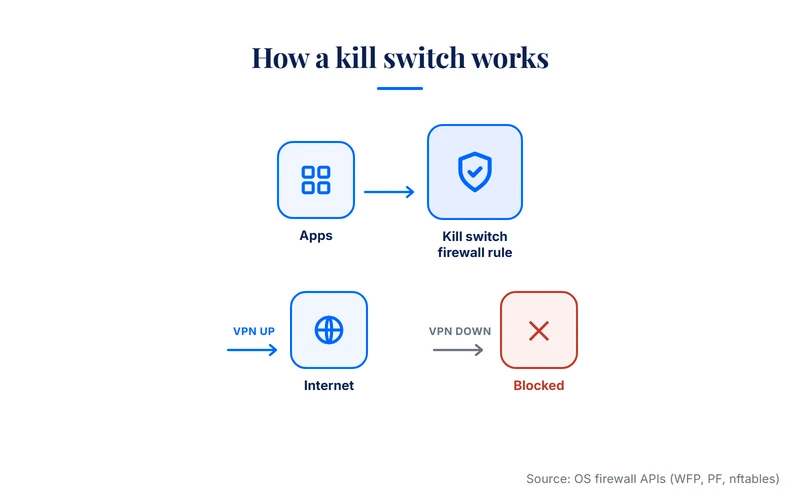
A kill switch is implemented as a firewall rule, not as an app behavior. The technical mechanism varies by operating system, but the principle is consistent.
Windows. The VPN app installs a Windows Filtering Platform (WFP) rule that blocks all outbound traffic unless it passes through the VPN tunnel interface. When the tunnel drops, the WFP rule denies non-tunnel traffic. The same rule allows traffic when the tunnel is up.
macOS. Similar approach via PF (Packet Filter) rules or via the NetworkExtension framework. The VPN app loads a system extension that controls the packet flow.
Linux. Typically via iptables or nftables rules. The VPN client modifies the firewall configuration when connecting and reverts when disconnecting cleanly.
iOS. Apple offers Always-On VPN as a managed device profile, and individual VPN apps implement their own block-on-disconnect logic via the NetworkExtension framework. Implementation quality varies.
Android. Android offers a system-level "Block connections without VPN" toggle in network settings, independent of the VPN app. This is the most reliable kill switch on Android because it is enforced by the OS itself, not by the VPN app.
Router-level. A kill switch can also live on the router. The router firewall blocks all WAN traffic that does not match the VPN interface. This is the strongest implementation because it protects every device behind the router, including devices that cannot run a VPN app natively (smart TVs, IoT, game consoles).
The two main types: system-wide vs application-level
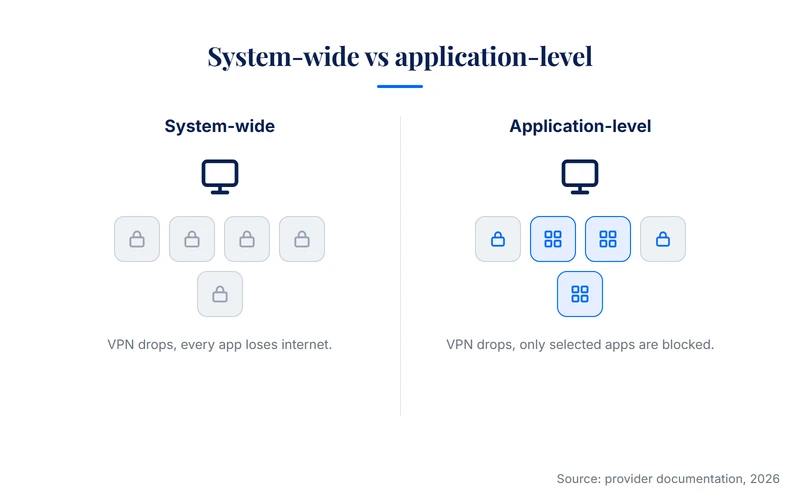
Kill switches come in two flavors.
System-wide kill switch. Blocks all network traffic from the device when the VPN drops. Every app stops connecting. Most VPN providers ship a system-wide implementation by default on Windows and macOS.
Application-level kill switch. Blocks only specific applications from connecting when the VPN drops. Other apps keep working normally. Useful for users who want their browser, BitTorrent client, or specific work apps protected, but do not want their entire device to lose internet when the VPN reconnects.
NordVPN's app-level feature is one of the most polished examples on Windows. ExpressVPN's "Network Lock" implements a system-wide variant. Surfshark and Proton VPN ship both modes on most platforms.
Choose system-wide if your priority is maximum privacy at the cost of occasional disruption. Choose application-level if your priority is keeping non-sensitive apps connected (a music player, a chat app for family) while protecting the high-stakes ones.
When you should always have it on
The default position should be: kill switch on. Four situations make it non-negotiable.
For everyday browsing on your home connection, the case is weaker. We cover the exceptions in the next section.
When you might turn it off
The kill switch is not free of cost. Two scenarios justify turning it off temporarily.
Local network resources. If your kill switch is system-wide, it blocks access to printers, NAS drives, and smart home devices on your local network when the VPN drops. Some apps include a "local network bypass" toggle to keep LAN traffic working while still blocking WAN traffic. If your app does not, switching the kill switch off temporarily is faster than reconfiguring routes.
Captive portals. Hotel and airport Wi-Fi often requires you to authenticate through a captive portal page before granting internet access. If the VPN is on and the kill switch is enforcing, you cannot reach the portal to authenticate. Workaround: turn off the kill switch, complete authentication, then re-enable the kill switch and connect the VPN.
For both scenarios, the trade-off is brief and intentional. Never leave the kill switch off as a default state. The point of the feature is to be on.
Which VPN providers offer a reliable kill switch
Most major paid VPNs ship a kill switch in 2026. Reliability varies. Independent reviewer reports and provider documentation converge on a short list of providers with mature implementations.
NordVPN. System-wide kill switch on Windows, macOS, Linux, iOS, Android. Plus an app-level kill switch on Windows that lets users select specific apps to block. Read our full NordVPN review for the broader feature breakdown.
ExpressVPN. "Network Lock" is the system-wide kill switch, available on Windows, macOS, Linux, and routers. The router-level implementation is one of the most polished in the market. Read our ExpressVPN review for the full breakdown.
Surfshark. System-wide kill switch on all major platforms. Includes a soft-fail mode that warns the user before fully blocking, useful for less technical users.
Proton VPN. System-wide kill switch on all platforms, plus a "Permanent kill switch" mode that blocks all non-VPN traffic even when the VPN app is closed.
Free VPNs. Most bulk free apps either omit the kill switch entirely or implement it unreliably. The four credible free tiers (Proton VPN, Windscribe, hide.me, TunnelBear) ship working kill switches, though sometimes with limitations on platform support. If your VPN does not list a kill switch on its feature page, assume it does not have one.
How to test your kill switch is working
A kill switch is one of the few VPN features you can test in two minutes without specialist tools.
Connect to your VPN. Confirm the app shows connected. Verify your IP at a leak test site like ipleak.net. It should show the VPN server IP, not your real one.
Kill the VPN process from Task Manager (Windows) or Activity Monitor (macOS), turn off Wi-Fi briefly, or use the app disconnect button.
If the website loads during the gap, your kill switch is not working. If the browser shows a network error, your kill switch is working.
Same setup, but during the gap run dnsleaktest.com. Your DNS server should not resolve to your ISP. If it does, your DNS leaks through the kill switch. Repeat on every device and platform, since behavior differs by OS.
FAQ
Final word
A VPN kill switch is the difference between intermittent privacy and continuous privacy. Without it, every VPN drop is a privacy gap. With it, drops cause inconvenience but never expose your traffic.
The cost of using a kill switch is minor (an occasional disconnect, brief captive portal friction). The cost of not using one when you need to is direct: real IP exposure, DNS leaks, account flags on streaming services. The asymmetry favors keeping the kill switch on.
If your current VPN does not have a working kill switch, replace it. In 2026 the feature is standard on every paid VPN worth using. For a broader explainer on how a VPN works in the first place, see what is a VPN.
Related reading
Sources
This guide synthesizes the following public sources, consulted in May 2026:
- NordVPN kill switch documentation, support.nordvpn.com (verified May 2026)
- ExpressVPN Network Lock documentation, expressvpn.com/support (verified May 2026)
- Surfshark kill switch documentation, surfshark.com/help (verified May 2026)
- Proton VPN kill switch documentation, protonvpn.com/support (verified May 2026)
- Apple iOS NetworkExtension framework, developer.apple.com
- Android "Block connections without VPN" feature, source.android.com
- WireGuard protocol documentation, wireguard.com
- ipleak.net and dnsleaktest.com (public leak test tools)
Provider feature details and platform support reflect published documentation at the time of writing and may change. Verify current provider terms before subscribing.
Published: May 29, 2026 · Author: Simon Phillips
