
Education
What Is a VPN Tunnel? How It Works in Plain English
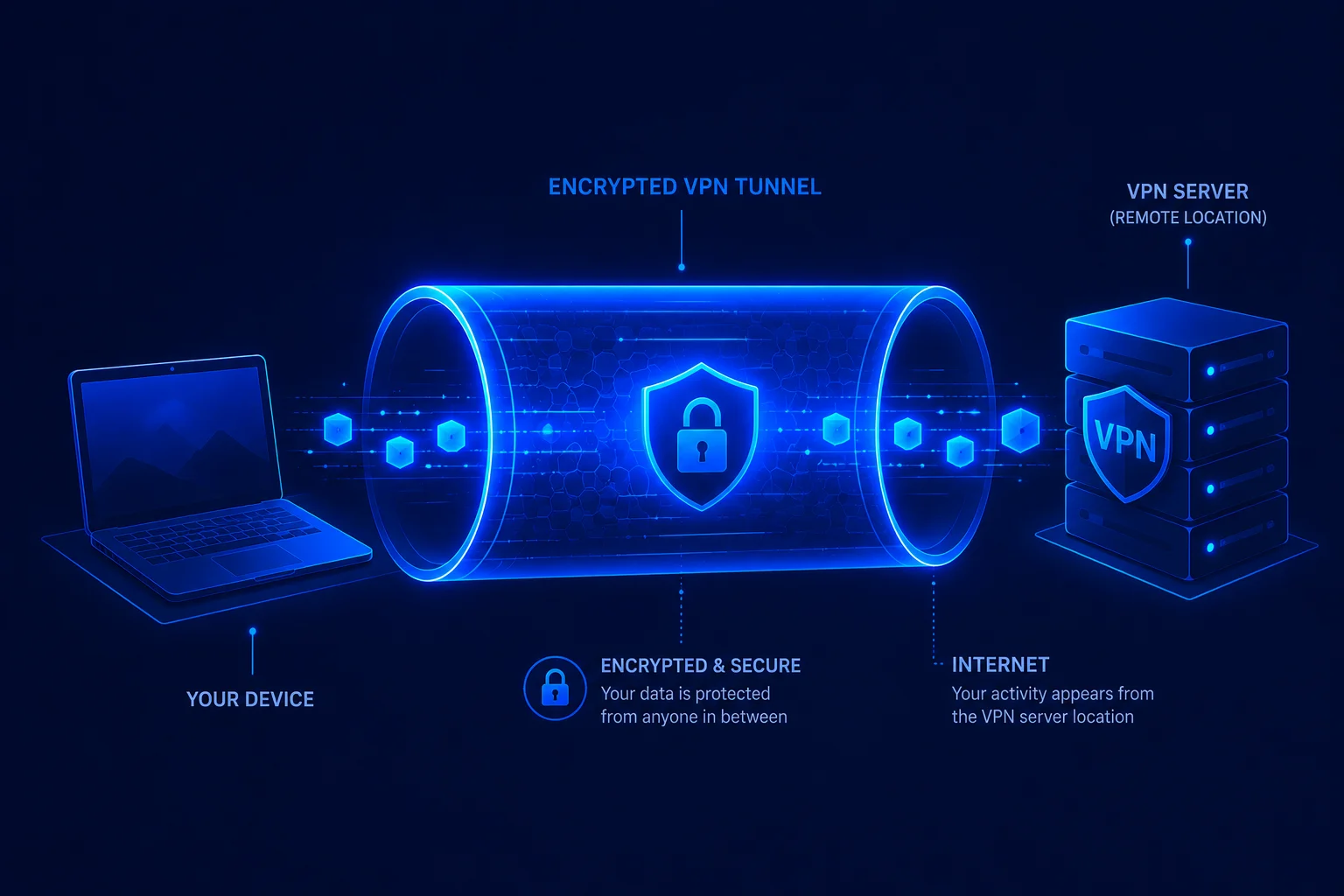
A VPN tunnel is an encrypted connection between your device and a VPN server. It protects traffic while it crosses your local network and internet provider, then the VPN server forwards that traffic toward its final destination.
What is a VPN tunnel?
A VPN tunnel is a protected path created across another network, usually the public internet. Your device places network packets inside an encrypted outer packet and sends them to a VPN server. The server removes that outer layer and forwards the original traffic. Replies travel back through the same protected path.
The word tunnel describes encapsulation. One packet travels inside another packet until it reaches the tunnel endpoint. Encryption prevents observers between those endpoints from reading the protected contents. Authentication helps each endpoint confirm that it is communicating with the expected peer.
A useful analogy is a locked delivery box. A carrier can see where the box is going, but cannot inspect the letter inside it. The VPN server opens the box and sends the letter onward. The analogy has an important limit: the VPN server handles the traffic after decryption, so using a VPN transfers some trust from the local network and internet provider to the VPN operator.
How does a VPN tunnel work?
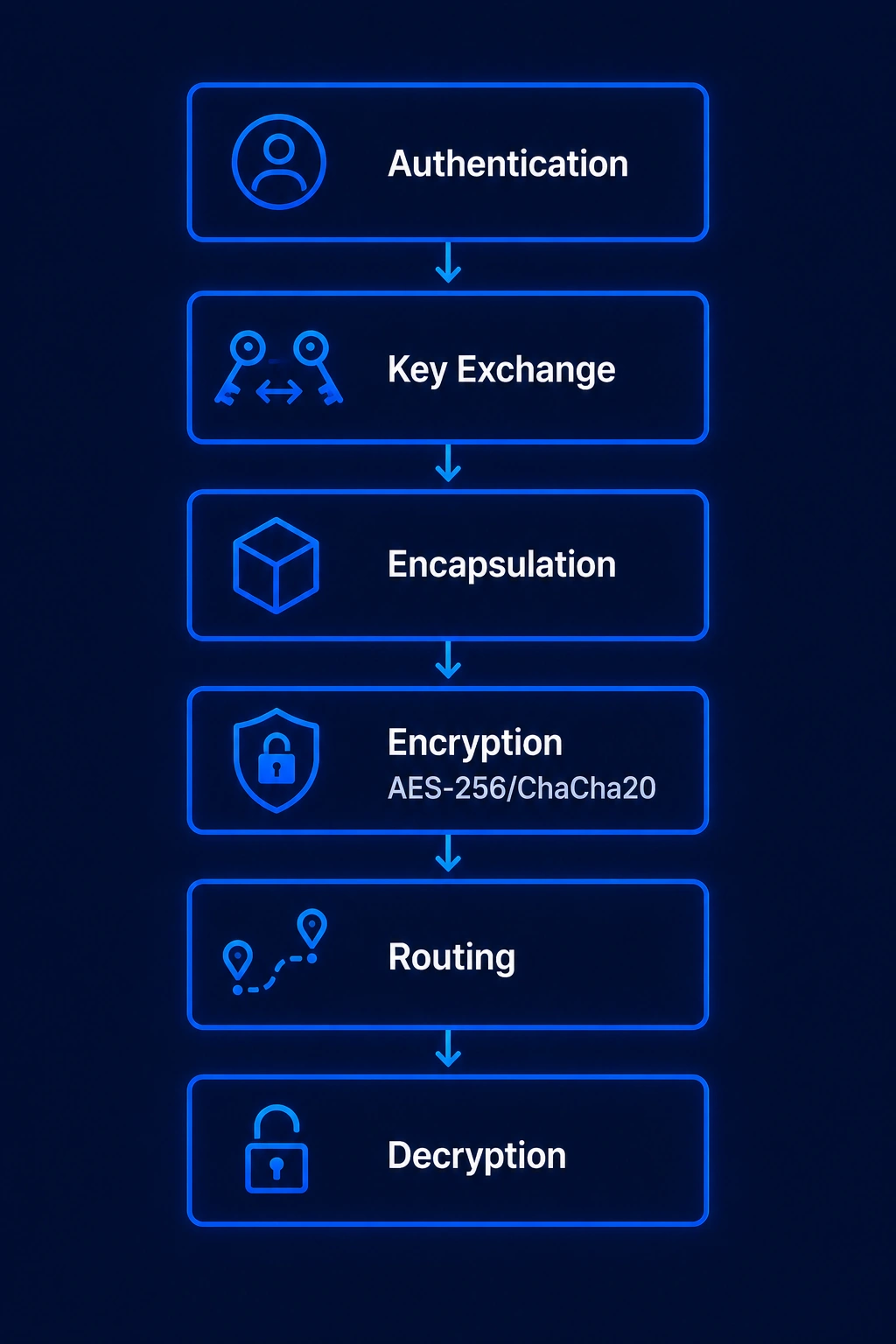
The details vary by protocol, but a typical connection follows four broad steps.
1. The client contacts a VPN server. The VPN app selects a server and starts a handshake. The client and server authenticate each other according to the protocol and configuration.
2. Both sides establish session keys. Modern protocols use a key exchange to derive temporary symmetric keys without sending those final keys across the network. These keys are used to protect the session.
3. The client encrypts and encapsulates traffic. Packets selected by the device routing rules enter the tunnel interface. The VPN protocol encrypts and authenticates them, then places the protected data inside packets addressed to the VPN server.
4. The VPN server decrypts and forwards traffic. The server verifies each protected packet, removes the tunnel layer, and routes the original traffic to its destination. Return traffic is protected before it travels back to the client.
Routing matters as much as encryption. A full tunnel sends most eligible device traffic through the VPN. Split tunneling sends only selected apps or destinations through it.
What a VPN tunnel hides, and what it does not
On a correctly configured connection, the local Wi-Fi operator and internet provider can see that your device is exchanging encrypted traffic with a VPN endpoint. They can still observe metadata such as the VPN server address, connection timing, and data volume. They should not be able to read the protected payload or see the final destinations carried inside the tunnel.
Websites normally see the VPN server's public IP address instead of the public IP assigned by your internet provider. That does not make you anonymous. Websites can still recognize signed-in accounts, cookies, browser characteristics, and activity you submit directly. The VPN provider can also occupy a privileged network position, which is why ownership, logging practices, app security, and independent audits matter.
A VPN also does not remove malware, prevent phishing, or make unsafe downloads trustworthy. It protects a network path. It does not replace endpoint security, software updates, strong authentication, or sound judgment.
VPN tunnel vs HTTPS
HTTPS and a VPN protect different parts of a connection. HTTPS encrypts data between a browser or app and the service it contacts. A VPN encrypts selected traffic between the device and the VPN server.
When both are active, the HTTPS connection remains encrypted after it leaves the VPN server and continues to the website. This layered protection is useful because the VPN operator can route the connection but cannot read properly encrypted HTTPS content. HTTPS does not hide every destination from the local network in the same way a full VPN tunnel can, while a VPN does not replace the end-to-end protection provided by HTTPS.
VPN tunnel mode vs transport mode
Tunnel mode and transport mode are formal IPsec terms defined in IETF RFC 4301. They do not describe every VPN protocol in exactly the same way.
IPsec tunnel mode protects an entire inner IP packet and adds a new outer IP header. The outer header identifies the tunnel endpoints, while the protected inner header retains the original source and destination information. Security gateways commonly use this mode for site-to-site connections.
IPsec transport mode primarily protects the payload carried by the original IP packet. The original IP header remains available for routing. It is commonly associated with host-to-host protection rather than a consumer VPN app routing general internet traffic.
Common VPN tunneling protocols
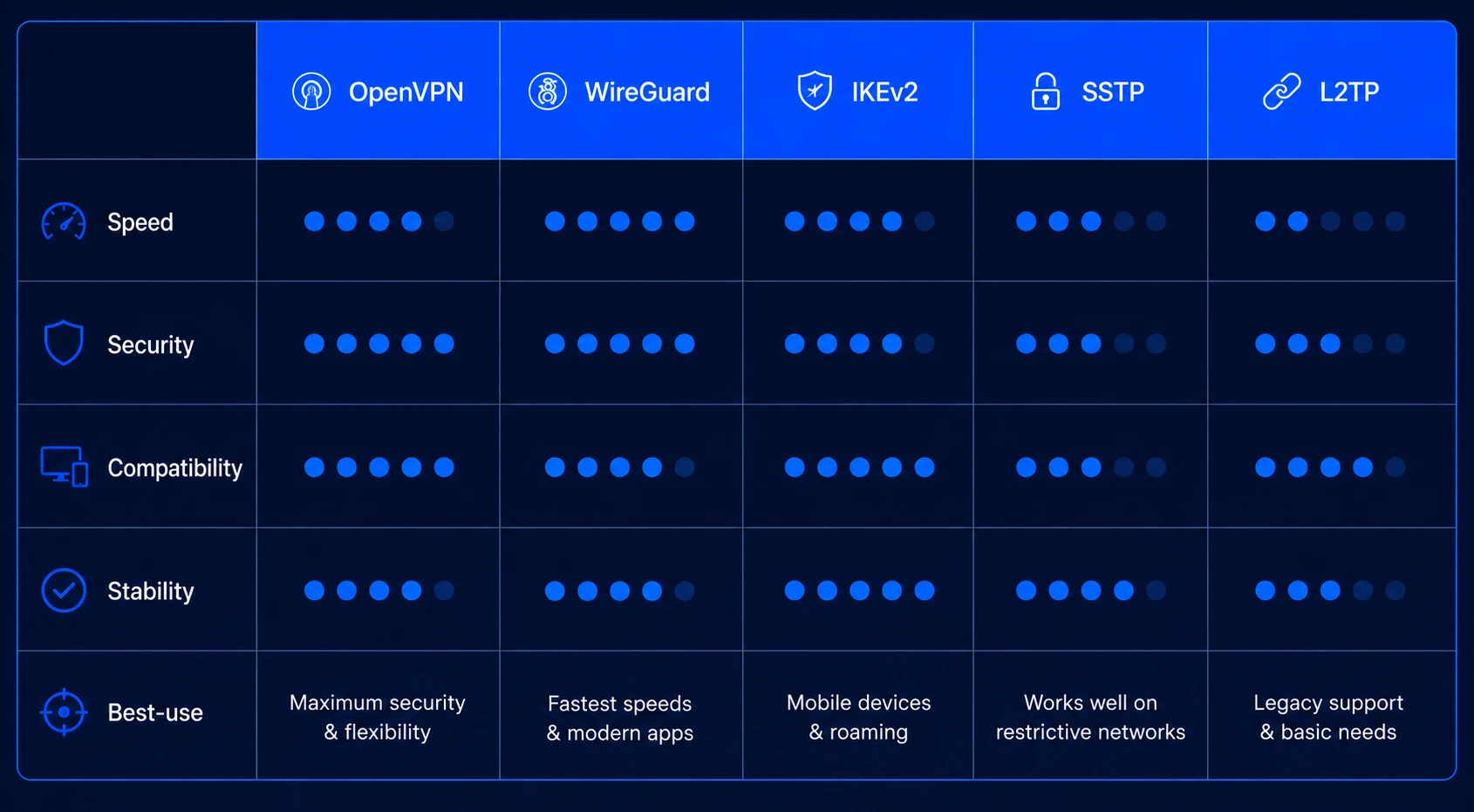
WireGuard is a compact Layer 3 tunnel that uses a fixed modern cryptographic suite, including Curve25519, ChaCha20-Poly1305, BLAKE2s, and HKDF. Its official protocol documentation describes periodic handshakes and rotating keys for forward secrecy. WireGuard uses UDP and leaves features such as obfuscation to other layers.
OpenVPN is a mature, configurable protocol built around TLS and available on many operating systems and network devices. It can operate over UDP or TCP. Its flexibility is valuable where compatibility and detailed configuration matter, although results depend heavily on settings and hardware.
IKEv2 with IPsec uses IKEv2 to establish and maintain IPsec security associations. The standard is defined in RFC 7296. It is widely supported by operating systems and is well suited to connections that move between networks.
Provider protocols include systems such as NordLynx, Lightway, and Stealth. These are separate implementations with different design goals. NordLynx is based on WireGuard. ExpressVPN describes Lightway as its own protocol and is reimplementing it in Rust. Proton VPN describes Stealth as an obfuscated protocol designed to make VPN traffic harder to identify. They should not be treated as interchangeable WireGuard variants.
L2TP with IPsec and SSTP remain available on some systems for compatibility. PPTP should not be used because its security is obsolete. For a focused comparison, see WireGuard vs OpenVPN vs IKEv2.
How to test whether the tunnel is working
Start by recording your public IPv4 and IPv6 addresses before connecting. Connect the VPN, refresh the test, and confirm that the public addresses now correspond to the VPN connection rather than your normal internet connection.
Next, check DNS resolution. Unexpected resolvers can indicate that DNS requests are not following the intended route, although resolver names alone do not always prove a leak. Our DNS leak guide explains how to interpret the result.
A WebRTC test may display public, private, relay, or mDNS-masked candidate addresses. A private address such as 192.168.x.x is not the same as exposing your original public IP. Do not disable WebRTC automatically because that can break calls and browser communication features. Investigate only when the original public address is exposed outside the intended tunnel path.
Finally, test the kill switch in a controlled setting if the VPN app provides one. Confirm that traffic stops when the tunnel is interrupted and that IPv4, IPv6, DNS, and any split-tunneled apps behave as expected. The complete procedure is available in How to Test If Your VPN Is Working.
Common VPN tunnel problems
Connected but no internet. The problem can come from DNS, a stale route, captive portal authentication, firewall rules, or an unavailable VPN endpoint. Reconnect after completing any hotel or airport sign-in page, then try another server or protocol before changing system-wide DNS settings.
Slow connection. Distance, server load, protocol overhead, Wi-Fi quality, device performance, and the original connection can all affect speed. Compare the connection with and without the VPN, then test a nearby server and another supported protocol. No single protocol is always fastest on every device and network.
Frequent disconnects. Switching between Wi-Fi and cellular, aggressive power saving, unstable local connectivity, or blocked UDP traffic can interrupt a session. Check the app's reconnect and kill-switch behavior before assuming that encryption has failed.
A website still recognizes you. The tunnel may be working correctly. Account sign-in, cookies, browser fingerprinting, location permissions, and a known shared VPN address can still identify or classify a session.
The practical takeaway
A VPN tunnel protects traffic between your device and a VPN server. It can shield data from a local network, change the public IP address seen by destinations, and provide secure remote access. It cannot make a device anonymous, remove every tracking method, or turn the VPN operator into a neutral party. The strongest setup combines a modern protocol, correct routing, leak protection, secure apps, and a provider whose practices can be independently checked.
