
Education
VPN split tunneling explained: full vs split, when to use it
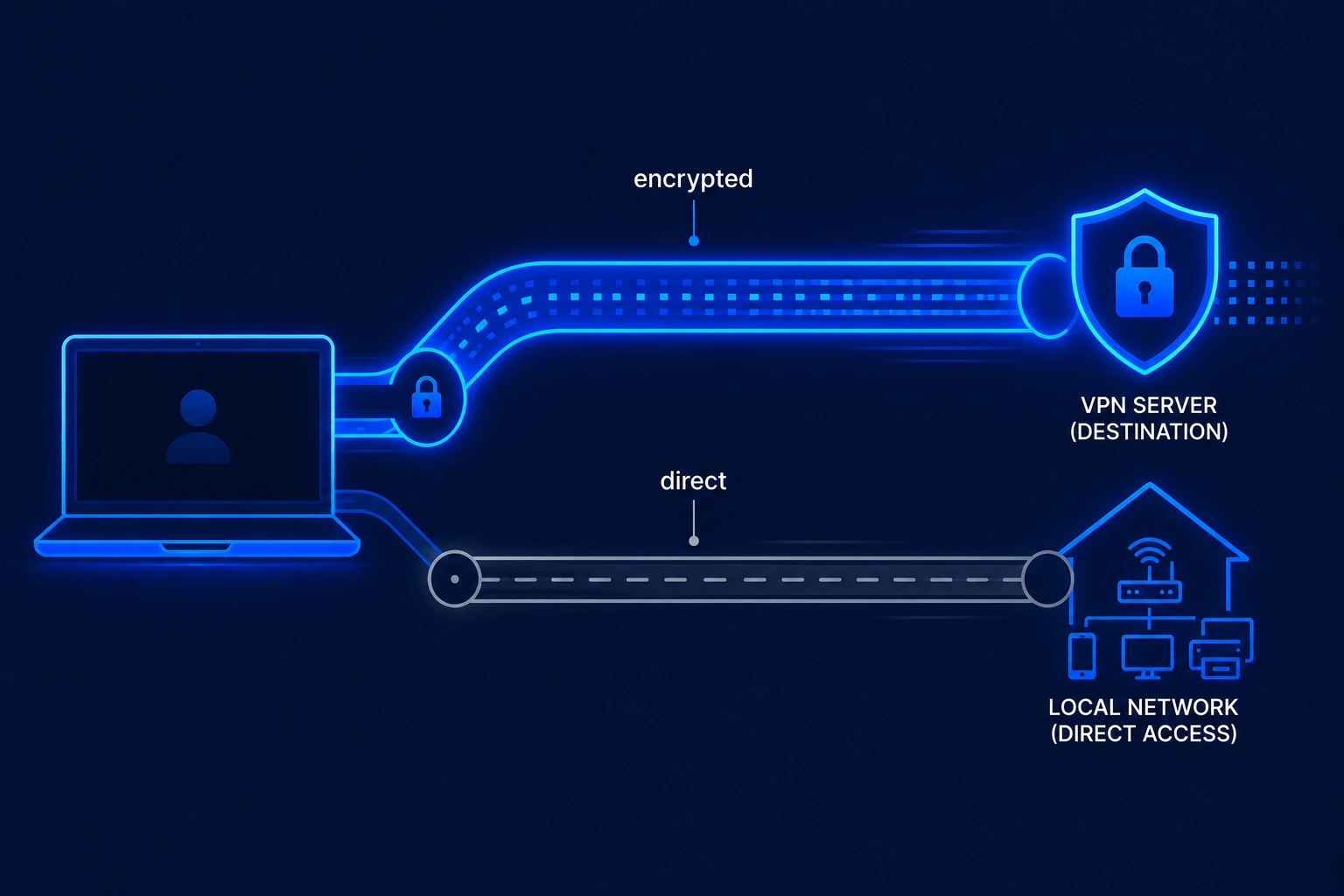
A VPN sends your traffic through an encrypted tunnel. Split tunneling lets you decide which apps go through that tunnel and which apps use your regular internet connection. This guide explains how VPN tunneling actually works, the difference between full and split tunneling, the protocols that build the tunnel (WireGuard, OpenVPN, IKEv2), and the cases where split tunneling helps or hurts. For a protocol deep-dive, see WireGuard vs OpenVPN vs IKEv2.
What is a VPN tunnel?
A VPN tunnel is an encrypted connection between your device and a remote VPN server. Every packet your device sends gets wrapped in an outer envelope, encrypted, then forwarded across the public internet to the server. The server unwraps the packet and sends it to its real destination. Replies come back the same way.
The basics
Think of a tunnel as a private mailing service. Without it, every letter you send shows your return address, the recipient, and the contents in plain view. With a VPN tunnel, you put the letter in a sealed box, the box goes to a forwarding office, and the office mails the letter from a new address. Observers on the road only see boxes moving between you and the forwarding office.
How encryption protects your traffic
Tunneling without encryption would be useless: anyone tapping the line could still read the contents. VPNs combine the tunnel (a routing concept) with strong encryption (a cryptographic process). The current baseline is AES-256, a cipher the US National Institute of Standards and Technology approved for classified information. WireGuard uses ChaCha20, a stream cipher that runs faster on mobile chips without dedicated AES hardware.
Without a tunnel, what your ISP sees
On a regular connection, your internet service provider sees every domain you visit (via DNS queries and the SNI field in TLS), the size and timing of every request, and the IP address of every server you reach. With a VPN tunnel active, your ISP sees one thing: an encrypted stream to a single VPN server IP. The websites, services, and apps inside the tunnel stay hidden from network observers.
How is tunneling accomplished in a VPN?
Tunneling combines three steps that run in order on every connection: encapsulation, encryption, and authentication. Skip any one of them and the tunnel is no longer secure.
Encapsulation explained
Encapsulation is the wrapping step. Your device takes an outgoing IP packet (with its real source IP, destination IP, and payload) and places it inside the payload of a new packet. The new outer packet is addressed from your device to the VPN server. To the rest of the internet, only the outer packet is visible. The inner packet (the one with your real destination) only becomes visible again after the server decrypts and unwraps it.
Encryption layer (AES-256, ChaCha20)
Before the inner packet gets wrapped, it is encrypted with a session key. The two common ciphers in modern VPNs are AES-256-GCM (used by OpenVPN, IKEv2, and most enterprise IPSec deployments) and ChaCha20-Poly1305 (used by WireGuard). Both provide authenticated encryption, meaning a tampered packet is rejected, not silently passed through. IPSec encryption is specified in RFC 4301; TLS-based tunneling (the family OpenVPN belongs to) follows RFC 8446 for TLS 1.3.
The handshake and authentication step
Before any data flows, your client and the VPN server perform a handshake. They prove their identities with certificates or pre-shared keys, agree on a cipher, and derive a session key using a key-exchange algorithm (Diffie-Hellman or its elliptic-curve variant). IKEv2, defined in RFC 7296, runs this handshake in two phases and is built specifically to survive network changes. WireGuard simplifies the handshake to a single round trip using the Noise Protocol Framework. Once the handshake completes, the tunnel is open and packets can flow.
What is split tunneling?
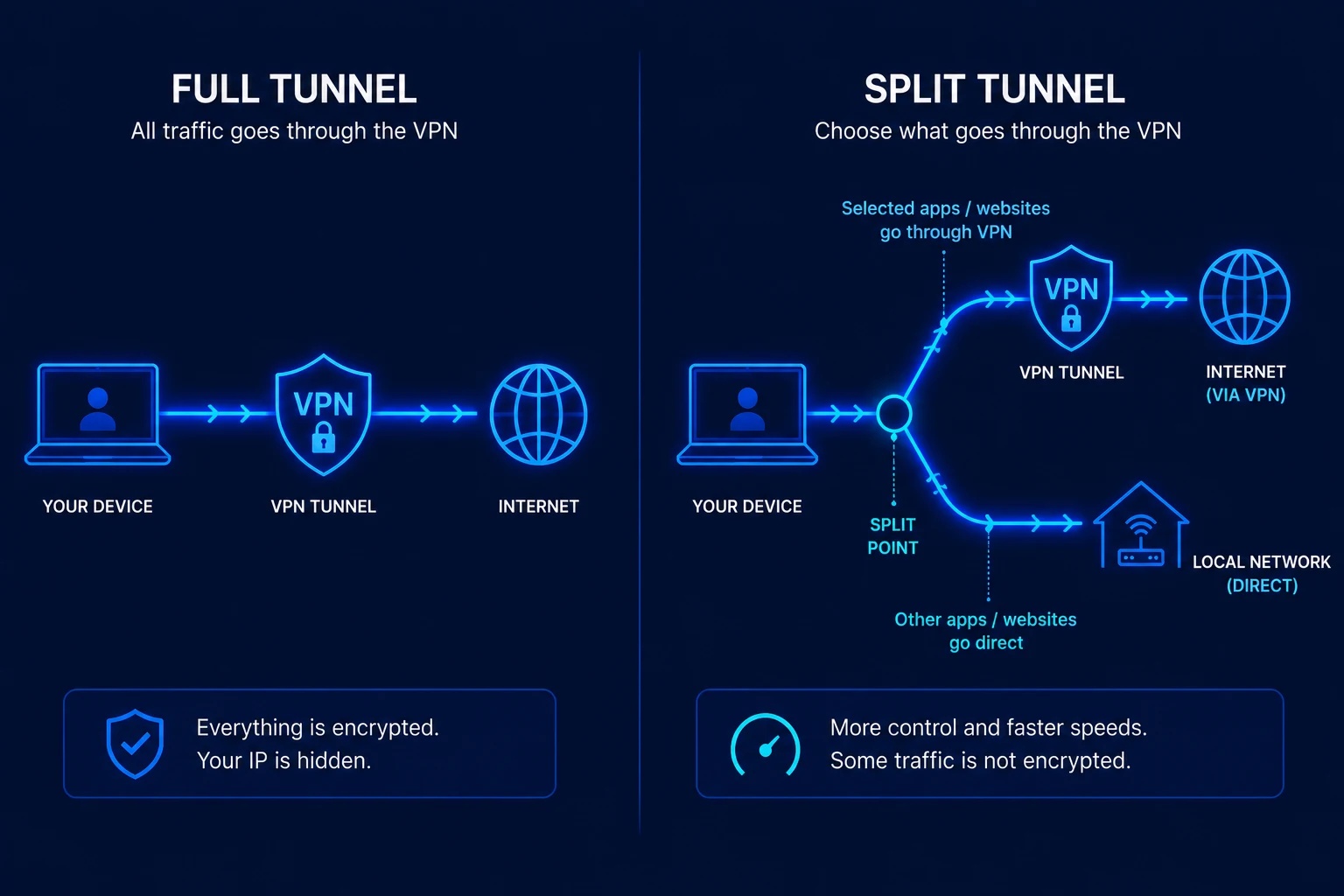
Split tunneling is a VPN feature that lets you route some traffic through the VPN tunnel while letting other traffic go directly to the internet on your normal connection. Instead of an all-or-nothing tunnel, you get a selective tunnel.
An example. You use a VPN to watch a streaming service that is geo-restricted in your region. At the same time, your laptop is talking to your local printer on the home network, and your banking app refuses to connect when it sees a foreign IP address. With full tunneling, the printer fails (the VPN server cannot reach it) and the bank app fails (the IP looks suspicious). With split tunneling, you tell the VPN to route only the streaming app through the tunnel. The printer and the bank app keep using the regular connection. Everything works.
Split tunneling is a routing decision, not a security weakness on its own. The traffic that does go through the tunnel is still fully encrypted. The traffic that goes outside is treated like any other unencrypted internet connection.
Split tunneling vs full tunneling
| Feature | Full tunnel | Split tunnel |
|---|---|---|
| Privacy coverage | All apps protected | Only selected apps protected |
| Speed | Slower (all traffic encrypted) | Faster for apps left out |
| LAN access (printer, Chromecast) | Often broken | Works for excluded apps |
| Banking apps with VPN blocks | May refuse to connect | Can be excluded, work normally |
| Risk if misconfigured | Low (fail-closed) | Higher (sensitive app may leak) |
| Best use case | Public Wi-Fi, full privacy | Mixed local + remote workflows |
Full tunneling is the safer default. Pick split tunneling only when you have a clear reason to leave specific traffic out.
Types of split tunneling
Providers expose split tunneling in several flavors. The right one depends on your operating system and how granular you need the control.
App-based split tunneling
You pick specific applications by name. Anything that app sends goes through the tunnel (or bypasses it, depending on the rule). This is the most common form on Windows and Android, where the VPN client can hook into the OS networking stack at the process level.
URL-based split tunneling
You pick specific domains or websites. Traffic to those domains goes through the tunnel; everything else stays direct. This requires a browser extension because operating systems do not normally route by hostname. The Surfshark Bypasser extension for Chrome and Edge is a typical example.
Inverse split tunneling
The default flips. Instead of "everything through VPN except these apps," inverse split tunneling says "nothing through VPN except these apps." This is useful when you only want one or two apps protected (say, a torrent client or a single browser profile) and prefer the rest of your traffic to run at full speed.
Terminology by provider
The feature has different names depending on the brand:
- NordVPN: "Split Tunneling" (Windows and Android)
- ExpressVPN: "Split Tunneling" (Windows, Mac, Android, routers)
- Surfshark: "Bypasser" (Windows, Android, browser extensions)
- Proton VPN: "Split Tunneling" (Windows, Android)
VPN tunneling protocols
A protocol defines exactly how the tunnel is built: which cipher, which handshake, which packet format. The four protocols you will see in consumer VPN apps are OpenVPN, WireGuard, IKEv2/IPSec, and a handful of provider-specific variants.
OpenVPN
Released in 2001, OpenVPN is the veteran. It runs over TCP (port 443, which lets it slip past most firewalls) or UDP (faster but more visible). It uses the TLS handshake for key exchange and AES-256-GCM for bulk encryption. OpenVPN is the most compatible protocol across operating systems and routers, but it carries more overhead per packet than newer options.
WireGuard
WireGuard was created in 2016 by Jason Donenfeld and merged into the Linux kernel in 2020. The reference implementation is around 4,000 lines of code, an order of magnitude smaller than OpenVPN. It uses ChaCha20-Poly1305 for encryption, Curve25519 for key exchange, and a single-round-trip handshake. Most major VPN providers switched WireGuard (or a WireGuard derivative) to their default by 2022, mainly because it is faster and easier to audit.
IKEv2/IPSec
IKEv2 (Internet Key Exchange version 2), standardized in RFC 7296 in 2005, pairs with the IPSec encryption suite. Its big advantage is the MOBIKE extension, which lets a connection survive when your device switches networks (Wi-Fi to cellular, for instance) without dropping the tunnel. This makes it the protocol of choice for mobile clients on iOS and Android.
Legacy: L2TP and PPTP
L2TP/IPSec and PPTP show up in old documentation and on legacy routers. PPTP has known cryptographic weaknesses and should never be used for anything sensitive. L2TP/IPSec is acceptable when nothing else is available but slower than the modern options. Treat both as fallbacks, not first choices.
Proprietary protocols: NordLynx, Lightway, Stealth
Some providers ship their own variants:
- NordLynx (NordVPN) wraps WireGuard with a double-NAT layer so the server does not have to store user IPs in plain form.
- Lightway (ExpressVPN) is a custom protocol built on the wolfSSL cryptographic library, designed for fast connection and low battery use.
- Stealth (Proton VPN) is a TLS-wrapped tunnel designed to bypass deep packet inspection in restrictive networks.
What uses tunneling beyond VPNs?
VPNs are the consumer-facing example, but tunneling shows up across networking. Understanding the broader family helps when troubleshooting or designing infrastructure.
SSH tunnels
SSH (Secure Shell) supports port forwarding, which is functionally a tunnel for a single TCP connection. Developers use SSH tunnels to reach databases behind a firewall by connecting to a jump host first, then forwarding a local port through the SSH session to the database server.
GRE tunnels
Generic Routing Encapsulation, defined in RFC 2784, is a stateless tunnel used in enterprise networks to carry one routing protocol inside another. GRE on its own does not encrypt; it is typically combined with IPSec when confidentiality is needed.
SSL/TLS as a form of tunneling
Every HTTPS connection is a small tunnel: the TLS handshake establishes an encrypted channel between your browser and the web server, and the HTTP request rides inside it. The difference with a VPN is scope. TLS protects one connection to one server; a VPN protects every connection from your device.
Tor as multi-hop tunneling
The Tor network builds a tunnel through three relays in series. Each relay knows only the previous and next hop, never the full path. This onion-routing model trades speed for anonymity. It is a different design from a VPN (no single trusted operator, much higher latency) but solves the same family of problems.
When should you use split tunneling?
Split tunneling solves specific problems. It is not a security upgrade and not a default to flip on for everyone.
Good use cases:
- You need local network access (printer, Chromecast, NAS) while a VPN protects your browser.
- Your online banking flags VPN IP addresses and locks the account.
- You want to stream a local TV service while keeping a work browser tunneled to a foreign region.
- You want to cut speed loss on trusted, bandwidth-heavy apps (video calls, game updates) while keeping a download client through the VPN.
Do not use split tunneling for:
- Torrenting. A peer-to-peer client outside the tunnel exposes your real IP to every peer in the swarm.
- Public Wi-Fi at airports, cafes, hotels. The whole point of the VPN there is full-traffic protection.
- Privacy-critical work (journalism, research on sensitive topics, dissident communication). Any leak defeats the purpose.
- Any case where you are not 100% sure which app handles sensitive data. Default to full tunnel.
Split tunneling support by VPN provider
| Provider | Feature name | Platforms | Type |
|---|---|---|---|
| NordVPN | Split Tunneling | Windows, Android | App-based |
| ExpressVPN | Split Tunneling | Windows, Mac, Android, routers | App-based |
| Surfshark | Bypasser | Windows, Android, Chrome and Edge extensions | App and URL-based |
| Proton VPN | Split Tunneling | Windows, Android | App and IP-based |
Note: iOS support is limited across the board. Apple's network extension framework does not expose process-level routing to third-party VPN clients, so per-app split tunneling on iPhone and iPad is mostly unavailable. Some providers offer per-website tunneling on iOS through Safari content blockers, but it is not the same feature.
Risks of split tunneling
Selective tunneling is a tradeoff, not a free upgrade. Three risks deserve attention.
- DNS leak: if the VPN client routes app traffic through the tunnel but lets DNS queries go out through the system resolver, your ISP sees the domains you visit even when the data is encrypted. Look for a client that forces DNS through the tunnel.
- Misconfiguration: picking the wrong app, or forgetting that a browser handles many services at once, can leak data you meant to protect. A web browser used for banking and for general browsing should usually stay inside the tunnel as a single unit.
- Browser cookies and fingerprints: a browser tab outside the tunnel still carries the same cookies as one inside. If you log into a service on the direct connection, the session token follows you back into the tunnel. Splitting browsers (one tunneled, one not) is cleaner than splitting tabs.
How to enable split tunneling, step by step
The interface varies by provider, but the pattern is similar. These steps assume the desktop app on a recent Windows build. Refer to each provider's official documentation for the exact wording in your version.
On NordVPN (Windows and Android)
- Open the NordVPN app and go to Settings.
- Click Split Tunneling and turn the toggle on.
- Choose "Enable VPN for selected apps" (default-off mode) or "Disable VPN for selected apps" (default-on mode).
- Click Add applications and pick the apps from the list.
On ExpressVPN
- Open the ExpressVPN app and click the menu (three lines, top left).
- Go to Options, then the General tab.
- Tick "Manage connection on a per-app basis."
- Choose whether selected apps should use the VPN or bypass it, then add them.
On Surfshark (Bypasser)
- Open the Surfshark app and click Settings.
- Select VPN settings, then Bypasser.
- Pick "Route via VPN" or "Bypass VPN" depending on the rule you want.
- Add apps from the device list, or switch to the IP/website tab to add a domain.
On Proton VPN
- Open the Proton VPN app and click Settings, then Advanced.
- Toggle Split tunneling on.
- Choose Standard mode (selected apps bypass) or Inverse mode (only selected apps use VPN).
- Add applications or IP addresses to the list.
After any change, reconnect the VPN so the new routing rules take effect. Test the result by visiting a "what is my IP" page from a tunneled app and a non-tunneled app: the two should report different addresses.
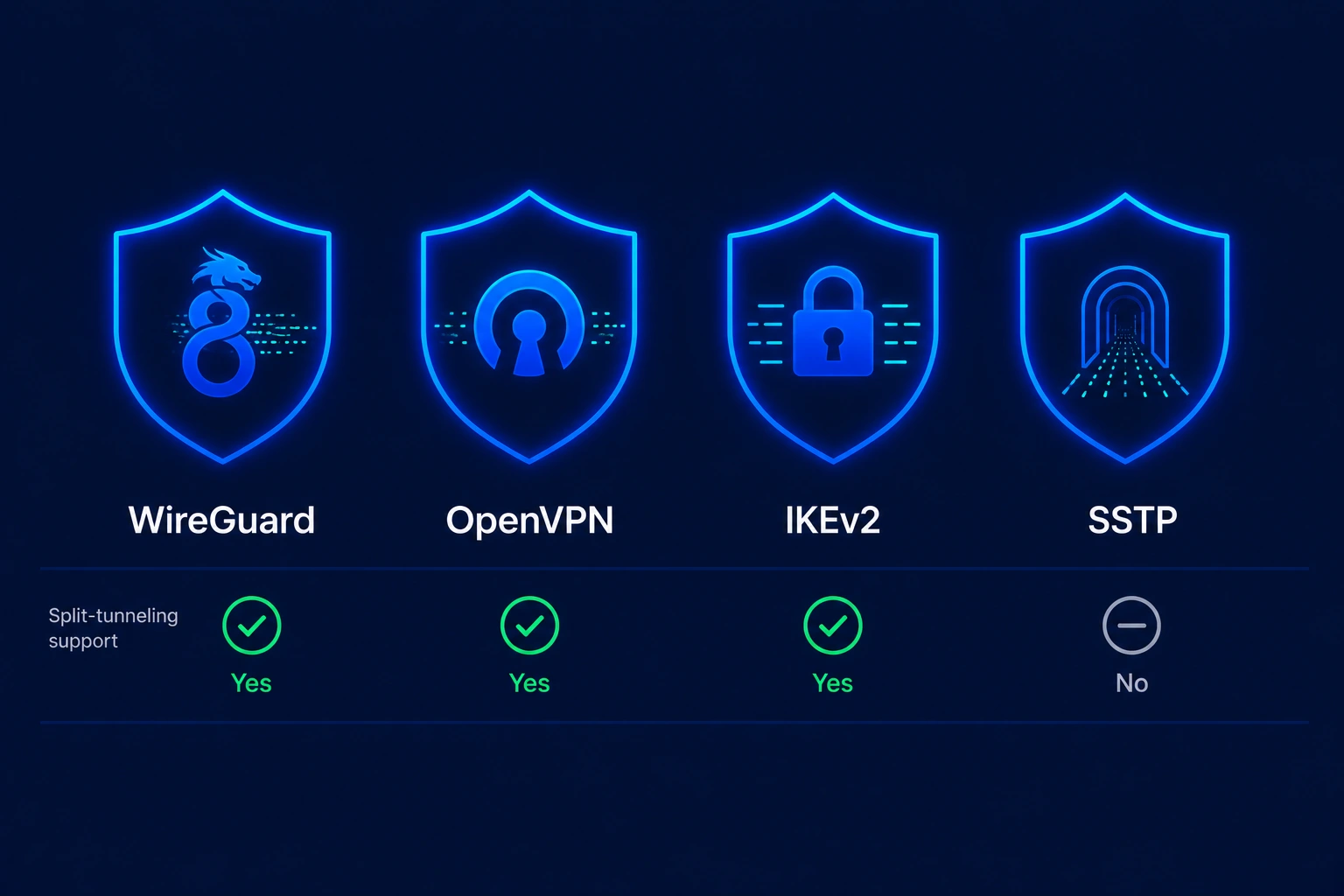
VPN split tunneling is useful when a trusted, bandwidth-heavy app does not need the encrypted route. VPN split tunneling should remain disabled for banking, private communications, unfamiliar Wi-Fi networks, and any app whose traffic must not bypass the VPN.
Frequently asked questions
Split tunneling is safe in the sense that the traffic that does go through the tunnel is still fully encrypted. The risk is operational: any app you leave outside the tunnel is exposed exactly as if you had no VPN at all. If you understand which apps you are excluding and why, split tunneling is fine. If you are not sure, use full tunneling.
Full tunneling routes every byte of traffic from your device through the VPN server. Split tunneling routes only the apps or domains you select; everything else uses your normal internet connection. Full tunneling is the safer default; split tunneling is a productivity feature for specific cases (local devices, banking apps, speed-sensitive workloads).
It speeds up the apps you leave outside the tunnel, because those apps no longer pay the encryption and routing overhead of the VPN. Apps inside the tunnel run at the same speed as on a full-tunnel connection. There is no global slowdown from enabling the feature itself.
Both, depending on the provider. App-based rules work at the operating system level (Windows, Android, Mac on some clients). URL-based rules require a browser extension because operating systems do not route by domain name. Surfshark's Bypasser, for example, ships browser extensions for Chrome and Edge that handle URL rules.
All four major consumer providers offer split tunneling in some form: NordVPN, ExpressVPN, Surfshark, and Proton VPN. Platform support varies. Windows and Android get the most complete app-based control. Mac support is partial (ExpressVPN supports it, NordVPN and Proton currently do not). iOS support is the most limited because of Apple's platform restrictions.
In most cases, no. Apple's NetworkExtension framework does not let third-party VPN apps route by process, so app-based split tunneling is not possible the way it is on Windows or Android. Some providers offer workarounds (per-domain rules through Safari content blockers, or VPN profiles that exclude IP ranges), but native split tunneling parity with desktop is not available on iPhone or iPad as of 2026.
The terms overlap. "Bypass" usually means a single rule that lets one app or destination skip the VPN. Split tunneling is the broader feature that supports multiple rules in either direction (which apps go through, which apps bypass). Surfshark calls its split tunneling feature "Bypasser," which is one reason the two terms get used interchangeably.
Our verdict: when VPN split tunneling helps and when to avoid it
VPN split tunneling helps in a handful of clear cases. Gamers use it to keep latency low on the game client while a browser stays on the VPN. Remote workers use it to reach a corporate resource through the tunnel while a printer on the home LAN stays reachable. Streamers use it to route one app through a foreign region without pushing every background sync through the same exit. The tradeoff is real: any app you exclude from VPN split tunneling loses the encryption and the IP masking that the tunnel provides. For banking apps most people keep them inside the tunnel, since the tiny latency cost is worth the added transport security on public Wi-Fi.
